

Read time :
How to Set Up Campaign Influence in Salesforce
Campaign Influence is one of Salesforce's most powerful native features for marketing teams, it connects campaigns directly to pipeline and revenue, so you can finally answer the question every CMO asks: which campaigns actually drive deals?
This guide walks you through the full setup : enabling the feature, choosing and customizing an attribution model, configuring fields, and building your first revenue reports.


If you're still deciding whether the feature is worth enabling, start with our breakdown of Salesforce Campaign Influence pros and cons.
What is Campaign Influence?
Campaign Influence is a Salesforce feature that tracks which campaigns touched a lead or contact before they converted into an opportunity. Instead of crediting a single campaign, it distributes credit across all the campaigns that played a role in the buyer's journey, using attribution models you define.
The result is a far more accurate picture of marketing's contribution to revenue and a foundation you can customize to match how your team actually thinks about attribution.
Campaign Influence 1.0 vs Customizable Campaign Influence
Before touching Setup, know that Salesforce ships two versions of this feature, and the difference matters:
Campaign Influence 1.0 (the original version) links campaigns to opportunities through contact roles, credits 100% of the opportunity to the Primary Campaign Source, and offers no flexibility in how credit is assigned.
Customizable Campaign Influence (the current version, and the one this guide covers) supports multiple attribution models, lets you split revenue credit across campaigns by percentage, and exposes influence data through its own report types.
Two practical implications:
- Once you enable Customizable Campaign Influence, the classic 1.0 reports stop being your source of truth — plan to rebuild reports on the new report types.
- Out of the box, only the default Primary Campaign Source model is populated automatically by Salesforce. Additional standard models (First Touch, Last Touch, Even Distribution) require Marketing Cloud Account Engagement (Pardot). Custom models exist as containers — Salesforce does not fill them for you; the influence records must be created via the API, custom automation, or a tool like Heeet.
That last point surprises most teams, and it's the main reason "we enabled Campaign Influence but the numbers look wrong" is such a common complaint.
1. Enable Campaign Influence
First, make sure the feature is turned on in your org:
- Log in to Salesforce as an administrator.
- Go to Setup (click your avatar in the top-right corner).
- In the Quick Find box, type Campaign Influence Settings.
- Click Campaign Influence Settings.
- Check the box to enable Campaign Influence.
- Click Save.
2. Assign the Right Permissions
Campaign Influence data is invisible to users who lack the right permissions — this is the most commonly skipped step.
- Admins configuring models need the Customize Application permission.
- End users need read access to Campaigns and to the Campaign Influence object. In most orgs this is handled by assigning the Sales Cloud User permission set (or an equivalent permission set license that includes CRM features).
- Users who will manually add or edit influence records also need edit access on Campaign Influence.
To assign: Setup → Permission Sets → Sales Cloud User → Manage Assignments → Add Assignment, then select your marketing and sales users.
If a user reports that the Campaign Influence related list is empty or missing while others can see data, permissions are the first thing to check.
3. Choose & Customize Your Attribution Model
Attribution models control how credit is split between campaigns. First Touch, Last Touch, Linear, U-Shape, there are many ways to measure how each digital touchpoint influenced your revenue, and the right one depends on your sales cycle and what you're trying to learn. Salesforce lets you create custom models based on your team's approach.
To create or modify models, go to Setup and search for Campaign Influence Attribution Models.
Which model should you choose?
There's no universally correct answer, each model tells a different story. First and Last Touch are simple but one-dimensional; Linear and U-Shape spread credit across the journey and reward the campaigns that quietly move deals forward. If your buyers touch many channels before converting, a multi-touch model will surface influence that single-touch models hide entirely. The practical constraint with native models is that the underlying touchpoint data has to be captured and maintained by hand, which is exactly what Heeet automates (more on that below).
4. Configure Campaign Influence Fields on Page Layouts
Campaign Influence stores data in custom fields on Lead, Contact, and Opportunity records. You need to add these to your page layouts so your team can see and interact with them.
- In Setup, go to Object Manager.
- Select Lead, Contact, or Opportunity (repeat for each).
- Click Page Layouts and open the relevant layout.
- Add the Campaign Influence related list to the layout.
- Save and repeat for the other objects.
5. Associate Campaigns with Leads and Contacts
With layouts configured, your team can now link campaigns to records manually — or Heeet can do this automatically based on actual web tracking data.
To add campaign influence manually on a record:
- Open a Lead or Contact record.
- Scroll to the Campaign Influence related list.
- Click Add Campaign Influence.
- Select the campaign and specify the influence type (Primary Campaign Source or Influenced Campaign).
- Repeat for Opportunity records where relevant.
If you're using Heeet, this association happens automatically — every campaign touchpoint detected in the buyer's journey is written directly to Salesforce, with no manual data entry.
6. Build Reports and Dashboards
Once data is flowing, you can measure marketing's impact on pipeline and revenue through reports. Go to Reports in Salesforce and create a new report using the Campaign Influence report type. Useful reports to build:
- Revenue influenced per campaign
- Cost per opportunity by channel
- Pipeline generated by attribution model
- Campaign touchpoints per closed deal
Add these to a Marketing ROI dashboard to give leadership a live view of campaign performance.
7. Train Your Team and Maintain Data Quality
Campaign Influence only delivers value if data is entered consistently. A few practical steps to keep it clean:
- Brief your marketing ops team on the attribution models in use and why.
- Set a standard for when to mark a campaign as "Primary" vs "Influenced."
- Run a monthly audit to catch records missing campaign associations.
- Review attribution reports quarterly and adjust models if needed.
Troubleshooting Common Issues
No influence records are appearing. Check, in order: Customizable Campaign Influence is enabled, the opportunity has contact roles, the contacts are campaign members, and the campaign membership falls within your Campaign Influence Time Frame.
Users can't see the Campaign Influence related list. Permissions (Step 2) or page layout (Step 5).
Influence percentages don't add up to 100%. Percentages are validated per model per opportunity. If numbers look off in reports, you're likely mixing models in one report filter by a single model.
Custom model shows no data. Expected — Salesforce doesn't populate custom models. Records must come from the API, automation, or an attribution tool.
First Touch / Last Touch models are missing. They ship with Marketing Cloud Account Engagement (Pardot). Without that license, you'll only see Primary Campaign Source plus any custom models you create.
Going further with Heeet
Customizable Attribution, Automated End to End
The main limitation of native Campaign Influence is that data entry is largely manual. If a lead visits from a Google Ad, reads a blog post, then fills in a form after clicking a LinkedIn retargeting ad, connecting all those touchpoints to the right campaigns takes significant manual effort — or custom development. Heeet captures, attributes, and writes every digital touchpoint to Salesforce automatically, then lets you configure exactly how that revenue is credited.
To operationalize these models on real CRM revenue, use Salesforce-native attribution models with Heeet.
Configure how revenue is calculated
Heeet lets you choose and customize your attribution model — First Touch, Last Touch, Linear, U-Shape, or your own weighting — and applies it to the real, tracked buyer journey rather than hand-entered campaign members.
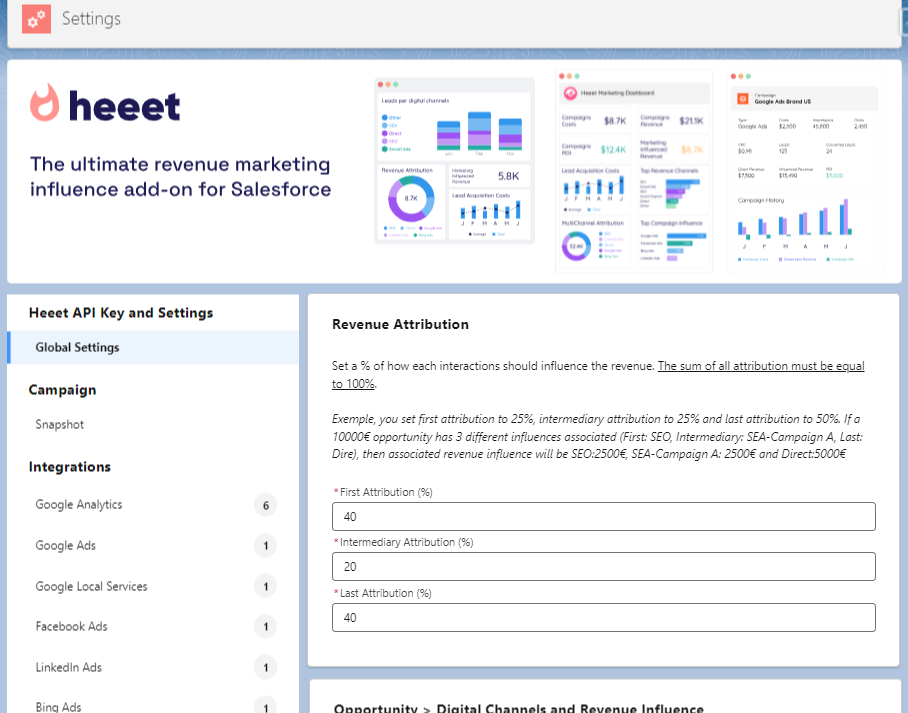
Choose and customize your attribution model directly in Heeet.
A worked example
Take the following buyer journey:
Sample buyer journey
First click : Prospect clicks your company page link on LinkedIn.
Intermediary : 2 clicks on a Google Ads campaign, 1 click on a LinkedIn Ad, 3 clicks through SEO.
Last click : Direct.
Here's the data you get in Salesforce with Heeet.
At the Lead level
You'll see the number of digital interactions, first- and last-click acquisition data, the number of days between first visit and form completion, and acquisition costs — plus how each digital channel influenced the prospect's journey.
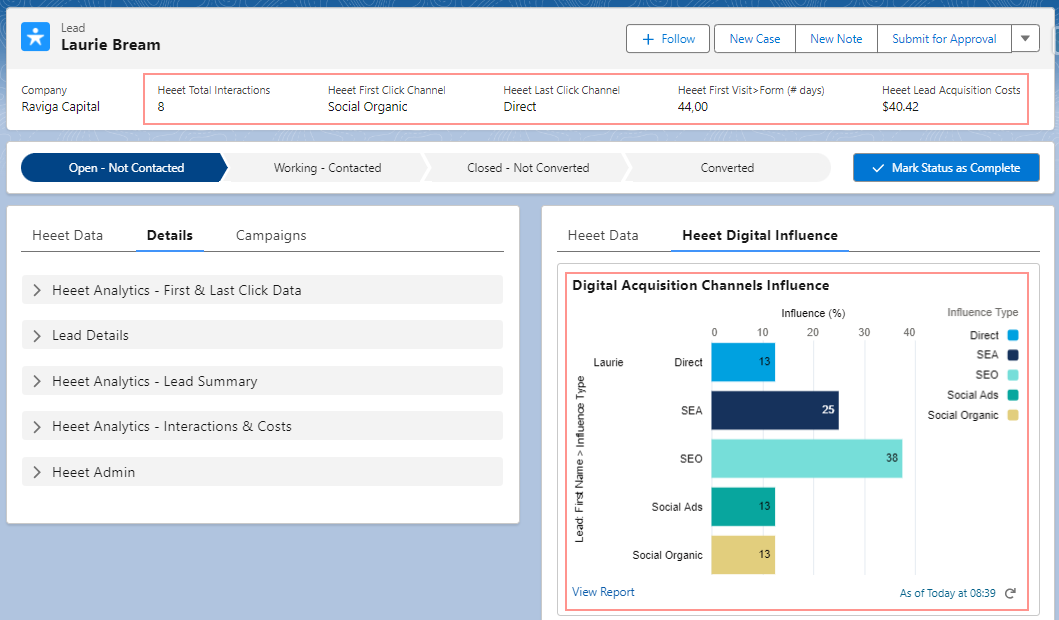
Channel influence and acquisition data, written directly to the Lead record.
Revenue split on the Opportunity
When that lead converts into a $10,000 opportunity, here's how the revenue is distributed across the influencing campaigns.
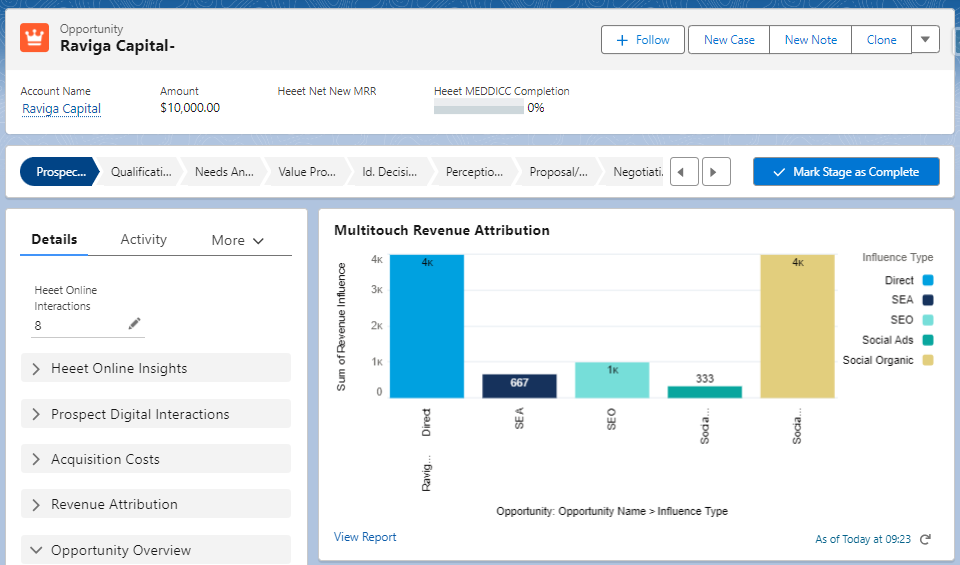
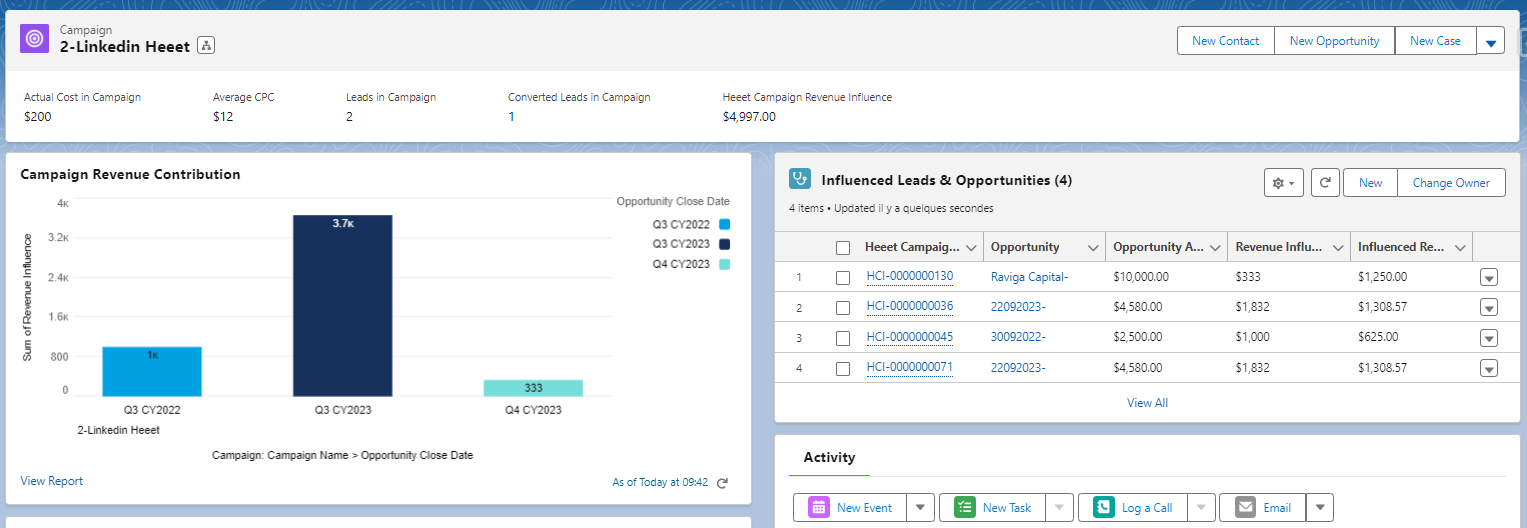
Campaign performance
Looking at your Campaigns in Salesforce, you get an accurate view of their performance — costs, CPC, influenced revenue, and more.
Build your attribution report
Finally, Heeet provides ready-made reports and dashboards that unify all your marketing metrics directly in Salesforce.

FAQ
What's the difference between Campaign Influence and Customizable Campaign Influence?Campaign Influence 1.0 credits 100% of an opportunity to its Primary Campaign Source. Customizable Campaign Influence supports multiple attribution models and splits revenue credit across campaigns by percentage. New implementations should use Customizable Campaign Influence.
Which permissions do users need to see Campaign Influence data?Read access to Campaigns and the Campaign Influence object — typically granted by assigning the Sales Cloud User permission set. Admins configuring models need Customize Application.
Does Campaign Influence work with Pardot (Marketing Cloud Account Engagement)?Yes — an Account Engagement license unlocks the additional standard models: First Touch, Last Touch, and Even Distribution. Without it, only the Primary Campaign Source model is populated automatically.
Why is my Campaign Influence data empty?The most common causes are missing contact roles on opportunities, campaign memberships outside the Campaign Influence Time Frame, or missing user permissions.
Can Campaign Influence do multi-touch attribution on its own?Only partially. Custom multi-touch models can be created but Salesforce won't populate them — the influence records must come from the API, automation, or an attribution tool like Heeet.
Summary
Setting up Campaign Influence in Salesforce comes down to enabling the feature, choosing and customizing an attribution model, configuring page layouts, associating campaigns, and building reports. Done well, it gives marketing a direct line between campaign spend and closed revenue. The main challenge is data quality — which is where a tool like Heeet removes the manual work entirely, automating attribution from first click to closed deal.
Other articles
Measuring SEO impact on offline revenue in Salesforce
Heeet connects SEO to Salesforce revenue with cookieless multi-touch tracking. See ROI, costs, and top-performing content driving your pipeline
Salesforce Campaign Influence: Pros, Cons & Limitations (2027)
Salesforce Campaign Influence explained: how it credits campaigns, which models need Account Engagement, its limits, and when native isn't enough.
Why Heeet is the perfect solution to manage campaign influence ?
See why Salesforce Campaign Influence and Pardot fall short. Learn how Heeet’s cookieless solution automates tracking across ads, channels, and keywords."
.svg)
Ready to track prospects from lead to close with Heeet?
Heeet gives marketers and sales professionals at IT & Security firms turn geuss work intro informed decisions that drive revenue while meeting the same secruity technical standards you provide your clients.