How to Set Up Google Ads Offline Conversion Tracking
Prerequisites
Before starting, make sure that:
- Heeet is installed and configured in your Salesforce org
- The Google Ads integration is connected in Heeet
- Google click IDs (GCLID) are captured and stored in Salesforce
- The Google Ads conversion action already exists
- You have access to Salesforce objects used for conversion tracking (Lead, Contact, or Opportunity)
Step 1: Create a Conversion Trigger
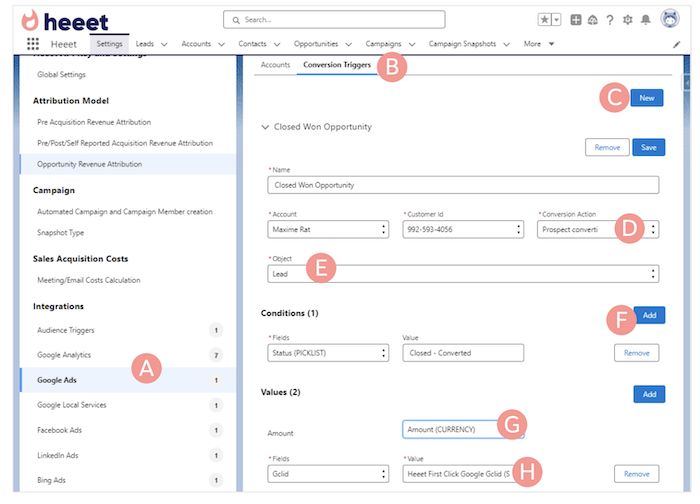
- Open Conversion Triggers (B)
- Click New (C)
- Select the connected Google Ads account, customer ID and existing Google Ads conversion (D)
- Select the Salesforce object that will trigger the conversion (Lead, Contact, or Opportunity) (E)
Step 2: Define the Triggering Condition
- Add a condition that defines when the conversion should fire (F)
- Example: Lead status = Qualified
- Example: Opportunity stage = Closed Won
- Use the API name of the Salesforce field and value
Step 3: Map Conversion Value and Identifier
- Select the Salesforce amount field to send as the conversion value (G)
- Choose the GCLID field to associate the conversion with the original click (H)
Tip: if you want to use first click Gclid if last click Gclid is missingor last click Gclid is first click Gclid is missing, ask a SalesforceAdmin to build a Formula Field in Salesforce (« GCLID ») takingone or the other value.
Step 4: Save and Activate
- Click Save
Once saved, offline conversions are sent automatically to Google Ads when conditions are met.
What Happens After Setup
- Conversions are sent automatically from Salesforce to Google Ads
- Google Ads attributes conversions to campaigns, ad groups, and keywords
- No manual CSV uploads are required
- Data stays aligned with real CRM outcomes
Send Offline Conversions to Google Ads
Push qualified leads and revenue from Salesforce back to Google Ads so bidding and reporting match real pipeline.