Read time :
How to Create a Salesforce Marketing Agent With Agentforce
Most marketing teams have the data, they just can't get to it fast enough. This guide explains how to build an Agentforce agent in Salesforce that answers campaign performance, channel ROI, and content conversion questions in plain language, with no reports and no waiting. Covers Topics, Scope, Actions, and a real worked example, plus a look at Heeet Force, a ready-to-deploy marketing analysis agent built on this exact architecture.



Your Salesforce org is full of campaign data. Lead sources, conversion rates, cost per lead, channel performance, content attribution it's all there. The problem isn't that the data doesn't exist. It's that getting an answer still takes too long.
You open a report, apply filters, cross-reference another dashboard, ask someone on the ops team to pull a specific date range, and by the time you have a clear answer, the meeting has already happened.
Agentforce agents for marketing solve a different problem than most people expect. This isn't about automating emails or triggering workflows. It's about giving your marketing team and your leadership a way to ask questions about campaign performance, channel efficiency, content conversion, and revenue attribution in plain language, and get a direct answer instantly, from inside Salesforce.
This guide walks you through exactly how to build that kind of agent, step by step.
What Is an Agentforce Agent for Marketing?
An Agentforce agent is an AI-powered assistant built natively into Salesforce that can interpret questions, query your data, reason across multiple sources, and surface answers all in a natural language conversation.
Unlike a static report or dashboard (which shows you what you chose to look at when you built it), an Agentforce agent responds to what you actually need to know right now. You don't filter. You don't pivot. You ask.
The key distinction: A dashboard tells you what happened. An Agentforce agent tells you what it means.
For marketing teams, this is the real unlock. The agent can draw on campaign records, lead data, opportunity attribution, and conversion history sitting in your Salesforce CRM and answer questions that would otherwise require a BI analyst, a custom report, or a lengthy data export.
- Which channel drove the most pipeline last quarter?
- What's the cost per lead trend for our paid search campaigns this year?
- Which piece of content is most correlated with closed revenue?
These aren't queries you run against a spreadsheet. They're questions you ask an agent that already understands your data.
When you connect your agent to Salesforce Data Cloud (Data 360), that intelligence deepens further. The agent gains access to unified profiles that span marketing, sales, and service touchpoints so it can reason across the full customer journey, not just the last-touch campaign.
The Building Blocks of an Agentforce Agent
Before you open Agent Builder, you need to understand the three components that define how an agent works: Topics, Instructions (Scope), and Actions. In an analysis-focused agent, each plays a specific role.
A Topic defines what category of question the agent handles. The Scope tells it how to reason and what data to use when answering. The Actions are the queries and retrievals it can execute to pull the answer together.
Step 1: Understand What a Topic Is (and Why It Matters)
What it is: A Topic is a category of analytical questions your agent knows how to handle. Think of it as organizing your agent's expertise into distinct domains. When someone asks a question, the Atlas Reasoning Engine reads it, matches it to the right Topic, and applies the instructions and Actions associated with that Topic.
Why it matters for marketing analysis: A well-designed Topic keeps the agent's reasoning focused. An agent with a "Campaign Performance" Topic knows it should be looking at campaign records, lead conversion data, and pipeline attribution not opportunity close dates or service case history. That focus makes answers faster and more reliable.
Example: A marketing team might create a "Channel Analysis" Topic so the agent knows how to respond to questions about which channels are driving the most leads, the lowest cost per acquisition, or the strongest pipeline contribution across any time period.
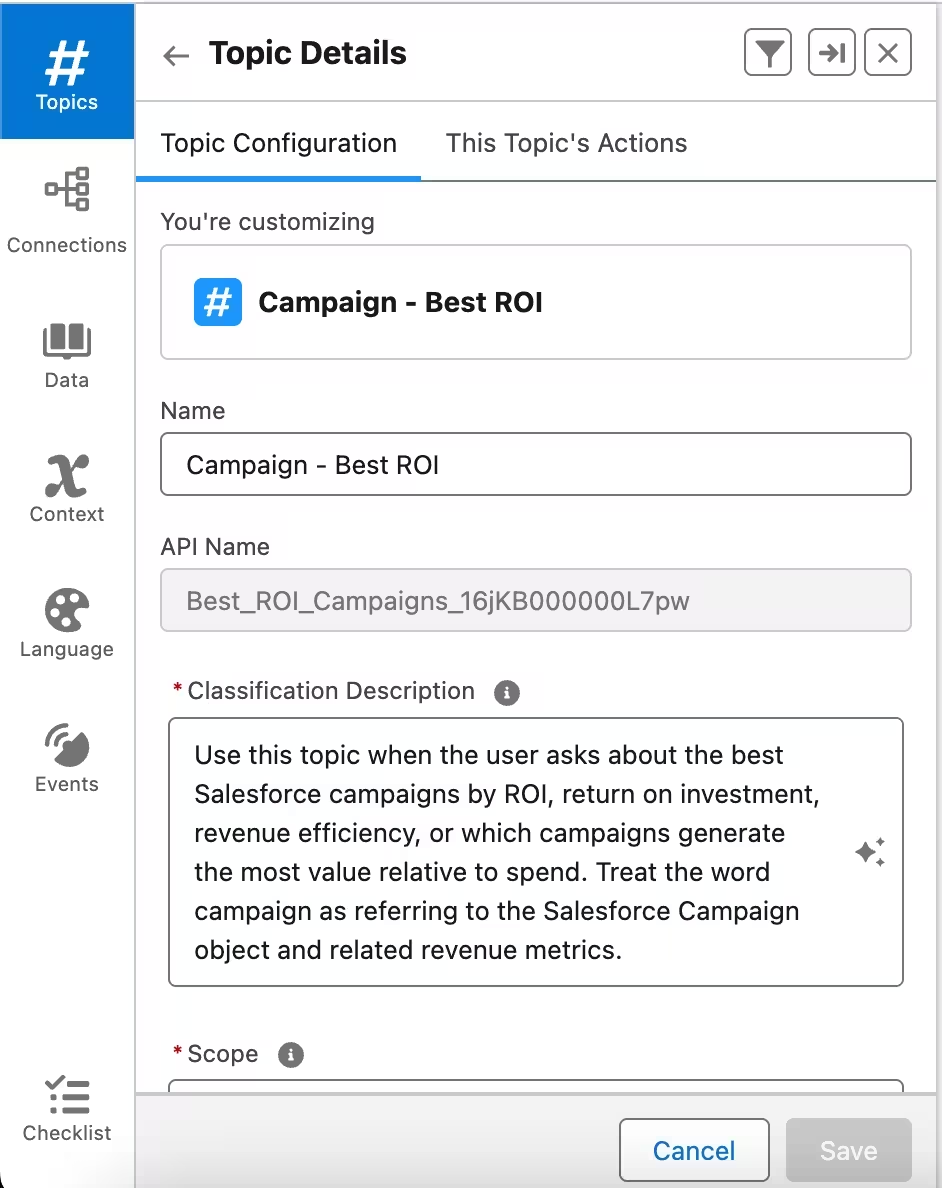
Step 2: How to Create a Topic in Agentforce Builder
- In Salesforce Setup, search for and select Agentforce Agents in the Quick Find box.
- Click + New Agent (or open an existing agent you're editing).
- In Agent Builder, click New in the Topics panel and select New Topic.
- Give the Topic a clear, analytical name that reflects the type of question it handles for example, Campaign Performance Analysis, Channel ROI, or Content Conversion Insights.
- Click Next to proceed to the Topic configuration screen.
Step 3: Write a Strong Topic Description (Classification Description)
What it is: The Classification Description tells the Atlas Reasoning Engine when to activate this Topic. It's the routing logic written in plain language. The engine reads the user's question, compares it against all your Topic descriptions, and activates the best match.
Why it matters: This is where precision earns its value. If your Classification Description is vague, the agent will mis-route questions or worse, attempt to answer a channel performance question using the wrong dataset entirely.
How to write an effective one: Describe the type of analytical question someone would ask, not just the subject area.
Weak example: "Handles questions about marketing campaigns."
Strong example: "Use this topic when someone asks about campaign performance, including questions about which campaigns generated the most leads, which had the lowest cost per lead, which drove the most pipeline, or how a specific campaign has trended over time."
Steps to configure it:
- In the Topic configuration screen, locate the Classification Description field.
- Write 1–3 sentences that describe the analytical intent behind the questions this Topic should handle.
- Use the natural language your team actually uses channel, campaign, content, ROI, conversion rate, pipeline, cost per lead — rather than internal system terminology.
- Save and test using the Conversation Preview panel on the right to verify the agent routes questions to the correct Topic.
Step 4: Set the Topic Scope
What it is: The Scope defines the analytical boundaries for this Topic what data the agent should look at, how it should reason, and what it should not do. In an analysis-focused agent, the Scope is your most important configuration decision.
Why it matters for marketing: Without a clear Scope, an agent tasked with answering campaign questions might pull from the wrong objects, mix incompatible metrics, or produce analysis that conflates different stages of the funnel. The Scope ensures the agent reasons within a defined frame and tells it exactly how to think when it's there.
Best practices for marketing analysis Scopes:
- Specify the Salesforce objects and data sources the agent should reason over. For example: "Draw from Campaign, Lead, Opportunity, and CampaignMember objects."
- Define the analytical frame. Should it default to the current fiscal year? The last 12 months? Make the default explicit so the agent doesn't guess.
- Tell it what not to do. If this Topic covers campaign analysis, the Scope should state clearly that the agent should not make recommendations about future spend only report on historical performance.
- State how it should handle ambiguous time references. "When no time period is specified, default to the current calendar year."
Steps to configure it:
- In the Topic configuration screen, locate the Scope field.
- Write in plain English what data the agent should analyze and how it should reason. Example: "Your job is to analyze campaign performance data from the Campaign and Opportunity objects in Salesforce. When asked about ROI, calculate it based on campaign cost versus influenced pipeline. When asked about best performance, rank by the metric most relevant to the question leads for volume questions, conversion rate for efficiency questions, pipeline for revenue questions. Do not make forward-looking budget recommendations."
- Add a fallback instruction for questions outside the Topic's scope: "If the question requires data you cannot access, say so clearly and suggest the user consult the relevant report."
- Click Save.
Step 5: Add Topic Actions
What it is: Actions are the data retrievals and queries your agent executes to answer a question. In an analysis-focused agent, Actions are how the agent gets from a question to an answer they define what it can look up, calculate, and surface.
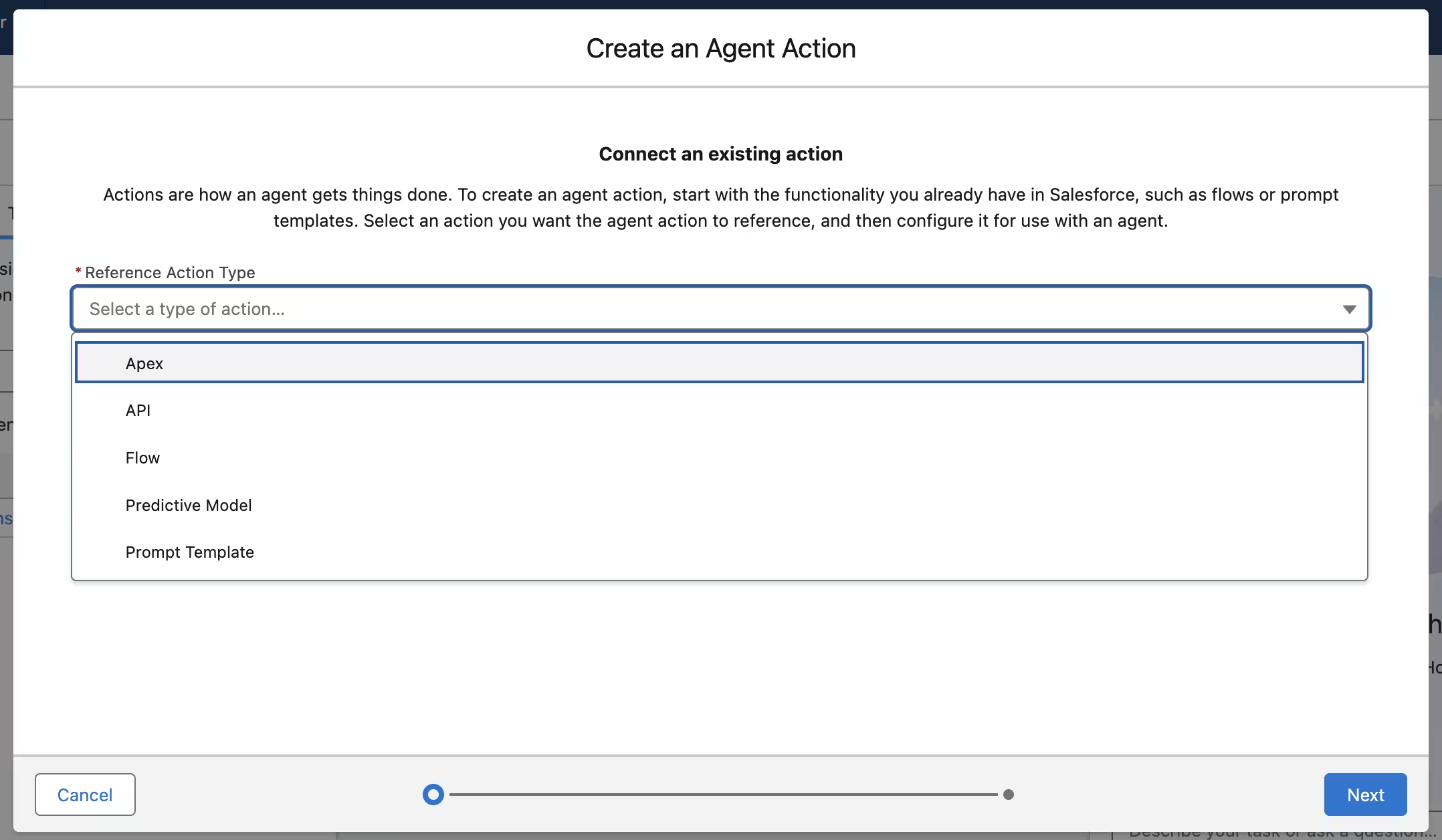
Why it matters for marketing: The quality of your agent's answers depends entirely on what Actions you've given it access to. An agent without the right Actions can reason brilliantly but answer nothing. With the right Actions, it can traverse your campaign data, pull conversion metrics, calculate ROI, and compare performance across time periods all from a single question.
Types of Actions for marketing analysis:
- Flows with SOQL queries : The most practical option. Build a Screen Flow or Autolaunched Flow that queries the Campaign, Lead, Opportunity, or CampaignMember objects and returns structured results. Wire this to the agent as an Action for retrieving specific metrics.
- Prompt Templates with data grounding :Use these when you want the agent to interpret and narrate data, not just return it. A Prompt Template can take raw campaign metrics and produce a plain-language summary of what the numbers mean.
- Apex Classes : For more complex analytical logic: calculating multi-touch attribution, aggregating pipeline by channel across custom fiscal periods, or computing cost-per-acquisition using non-standard field mappings.
- MuleSoft/External APIs : For pulling in performance data from outside Salesforce, such as ad platform spend from Google Ads or LinkedIn Campaign Manager, to compare against in-CRM conversion results.
Steps to add Actions to a Topic:
- Inside Agent Builder, navigate to your Topic and select the Actions sub-tab.
- Click Add Action.
- In the pop-up, select the Action type: Flow, Apex, Prompt Template, or MuleSoft API.
- Browse or search for the Flow or query you want to connect, or click New to create one from scratch.
- Write a precise description for each Action the agent uses this to decide which Action to call when answering a question. Example: "Use this action to retrieve campaign performance data including total leads generated, conversion rate, cost per lead, and influenced pipeline for a specified time period."
- Repeat for each analytical capability you want the agent to have.
- Click Save, then use the Conversation Preview panel to run test questions and verify the agent retrieves and interprets data correctly.
How This Looks in a Real Marketing Scenario
Let's put it together with a concrete example.
Goal: Build an agent that answers campaign and channel performance questions for the marketing team and leadership.
- Topic Name: Campaign Performance Analysis
- Classification Description: "Use this topic when someone asks which campaigns generated the most leads or pipeline, which channels performed best, what the cost per lead was for a specific campaign, how a campaign has trended over time, or which content drove the most conversions."
- Scope: "Your job is to analyze campaign, lead, and opportunity data in Salesforce to answer performance questions. Rank campaigns by the metric most relevant to the question being asked. Default to the current calendar year when no time period is specified. Do not make budget recommendations or predict future performance only report on what the data shows."
- Actions:
- Flow: Get Campaign Metrics (queries Campaign and CampaignMember objects for leads, conversion rate, and cost per lead by campaign and date range)
- Flow: Get Channel Performance (aggregates lead and pipeline data by Lead Source across a specified period)
- Prompt Template: Summarize Campaign Trend (takes raw monthly data for a specific campaign and narrates the performance trend in plain language)
With this setup, someone can ask "What was our best channel last quarter?" and the agent queries the right objects, compares channel performance across the relevant period, and delivers a ranked answer with the key metric in seconds, without a single report being opened.
Common Mistakes to Avoid
1. Confusing analysis agents with automation agents.The most common mistake is trying to make one agent both answer questions and take actions updating records, triggering journeys, sending notifications. These are fundamentally different modes of operation. Build them as separate agents with separate Topics. An analysis agent should query and report. An action agent should execute and update.
2. Writing Topics that are too broad.A Topic named "Marketing Questions" that handles campaign performance, content analysis, lead attribution, and channel ROI will produce inconsistent answers because the agent can't narrow its reasoning frame. One Topic per analytical domain campaigns, channels, content, revenue attribution — gives the agent the focus it needs to be accurate.
3. Not specifying the data objects in the Scope.If your Scope just says "answer questions about campaigns," the agent doesn't know whether to look at the Campaign object, CampaignMember, Opportunity, or Lead. Be explicit: name the objects, name the fields, name the logic for calculated metrics like ROI or cost per lead.
4. Building Actions that return too much data.An Action that returns every campaign record for the last three years will overwhelm the agent's reasoning. Design your Actions to return focused, filtered datasets the top N campaigns, a specific date range, a specific channel. Let the question determine the scope of the query, not the other way around.
5. Skipping the Testing Center.Salesforce's built-in Testing Center lets you run multiple questions simultaneously and inspect the Plan Tracer to see exactly how the agent reasoned through each one. Use it before going live. The most common issue a question routing to the wrong Topic is invisible until you test it.
What to Build Next
Once your analysis agent is running, you have the foundation for something significantly more powerful: a single conversational interface to your entire marketing dataset. Start with campaign and channel performance, then add Topics for content attribution, cohort analysis by lead source, or revenue influence by campaign type. Each new Topic extends what your team can ask without adding new reports, new dashboards, or new analyst requests. The architecture stays the same; the intelligence compounds.
See It in Action: Heeet Force, a Ready-to-Use Agentforce Marketing Analysis Agent
Building an analysis-focused Agentforce agent from scratch configuring Topics, writing precise Scopes, building data-retrieval Actions, testing edge cases — takes real investment. For marketing and revenue teams that want to go straight to value, we built Heeet Force: a pre-configured Agentforce marketing agent designed specifically for campaign performance analysis and revenue attribution, running natively inside Salesforce.
What Heeet Force Does
Heeet Force is built on the exact architecture described in this guide Topics, Classification Descriptions, Scopes, and Actions but pre-wired to Heeet's campaign attribution and revenue data. That means it already knows how to read your campaign performance, channel contribution, content conversion, and cost metrics, and can answer questions in plain language without you building a single Flow or query.
Instead of opening a report, applying filters, cross-referencing channels, and manually calculating ROI, your team or your CMO just asks:
- "What is the best channel this year?"
- "What is the campaign with the best cost per lead?"
- "What is the best campaign in 2025?"
- "What is the campaign that converted the most last quarter?"
- "What is the trend for the Google Ads "Competitor 2026" campaign?"
- "What is the content that converts the most?"
- "What is the campaign with the best ROI?"
- "What is the best channel last quarter?"
The agent doesn't retrieve a number and stop it reasons across your data, applies the right analytical frame for the question, and delivers an answer with context.
Why This Matters for Revenue-Focused Marketing Teams
The problem most marketing teams face isn't a lack of data. It's the time and friction between having data and getting an answer. Dashboards require the right person to know which one to open. Reports require the right filters to be set. Analysts require a Slack message and a wait.
Heeet Force removes that layer entirely. Any marketer, sales manager, or executive can ask a performance question in plain language and get a direct, data-grounded answer from inside Salesforce, in seconds. No intermediaries. No exports. No waiting.
This is what Agentforce makes possible when the right attribution data meets the right analytical Topics: your CRM stops being a system you report from, and starts being a system you have a conversation with.
If you're already a Heeet customer, Heeet Force is ready to deploy in your Salesforce org. If you're exploring how Agentforce can accelerate your marketing performance analysis, it's the fastest way to see the architecture described in this guide working in a live production context.
Other articles
AI Search Visibility: How to track the revenue impact of brand mentions
Learn to track and measure AI search ROI with proven GEO strategies. Complete guide to LLM mentions attribution, revenue tracking tools, and conversion optimization for B2B success.
How to Set Up Campaign Influence in Salesforce (Enable, Customize & Report)
Set up and customize Salesforce Campaign Influence step by step : enable the feature, choose an attribution model, configure fields, and build revenue reports.
.svg)
Ready to track prospects from lead to close with Heeet?
Heeet gives marketers and sales professionals at IT & Security firms turn geuss work intro informed decisions that drive revenue while meeting the same secruity technical standards you provide your clients.