







Read time :
Google Ads Attribution for B2B: How to Connect Ad Spend to Pipeline and Revenue in Your CRM
Paid-to-pipeline attribution is the practice of tying every paid ad click to its corresponding Opportunity and closed-won revenue in the CRM, where deals live, not inside the ad platform. This is the exact process our prospects ask us about in nearly every demo. They want to know how to set up the revenue link in Salesforce and HubSpot, and how to leverage the data to activate relevant audiences with their ads.


In this article, we will transition from theory and put things into practice. Starting with the typical journey, we will trace the path from a B2B ad click to a closed-won deal and examine how things changed at Ringover once the CRM became their system of record for attribution and ad performance tied to revenue.
The Paid Acquisition Manager’s Attribution Dilemma
When a new hire walks into an established paid acquisition program, the Google Ads dashboard to Salesforce pipeline report is often the first gap they try to plug. Google Ads claims to drive thousands of conversions per week through paid search. When looking at the revenue, Salesforce reported a handful of closed-won deals that quarter, with no clear way to tie either number back to the campaigns that generated them.
That's the gap your CFO keeps asking about. Google Ads attribution is handled within the Google Ads UI, showing the last click, the recommended model, and the triggered keyword. None of those answers only question that matters: did the six figures we spent on paid search last quarter produce pipeline, or just noise?
Why your Google Ads conversions don’t match Salesforce closed-won
When you’re working with two systems, two definitions of “conversion”, and two different timelines, it’s no surprise the numbers diverge.
Google Ads counts a conversion when a tracked event fires on your site or app. Usually, a form submission, a thank-you page view, a phone call, or a download. The event lives within Google’s attribution window, which defaults to 30 days for clicks and 1 day for views, and rarely extends past 90 days, even when extended.
Salesforce counts revenue when an Opportunity moves to closed-won. That happens after a demo, two pricing discussions, a procurement review, a legal markup, and a CFO sign-off. That’s a typical B2B sales cycle (60 to 180 days), often longer in enterprise and regulated verticals. By the time the Opportunity closes, Google’s attribution window has usually expired for the early clicks.
So the platform reports leads. The CRM reports revenue. And nothing in either system links a $12 click on a “marketing attribution software” search query to the $36,000 ACV Opportunity that closed eight months later.
In nearly every demo we run, the moment that lands hardest is when the marketing lead opens Salesforce next to Google Ads in a split-screen. Google Ads might report 47 conversions in a month, while Salesforce may show 4 closed-won deals for the entire program. That’s the gap marketers need to fill: deals marketing keeps losing credit for. They often appear as a sales-sourced deal, possibly influenced by Google Ads. Heeet fills that attribution void with multi-touch tracking throughout the entire extended customer journey.
The fix has to be applied somewhere, and we firmly believe it should be in the CRM. With a single source of truth in place, you can start tracing the path from ad click to revenue, and feed ad platforms the audience and offline conversion data to bid more effectively on revenue-generating leads.
This is the start to optimizing for revenue with a feedback loop of successful offline closed-won Opportunities, but you’ll need the right tools to maintain this consistent loop without regular breaks in syncing and manual repairs.
Why offline conversion import isn’t the simple fix most B2B teams hope for
The standard recommendation when paid attribution breaks down is to set up an offline conversion import. Google Ads offers it. LinkedIn has a version through its Conversions API (an interface that lets you send conversion data directly from your CRM to LinkedIn).
The premise is simple: capture the GCLID (Google Click Identifier, a unique code identifying each paid ad click) when the click lands, store it on the lead record in your CRM, and send a conversion event back to the ad platform when the deal closes.
For e-commerce, this works because the cycle is short, the GCLID is fresh, and revenue is known the moment the order ships.
For B2B, the picture is less forgiving. Four things tend to break offline conversion imports for paid media managers:
- GCLID expiration. Google retains a GCLID for 90 days by default. Past that window, the platform will not match the conversion event back to the original click. The limited window doesn’t suit B2B sales cycles, which routinely outrun it, especially in mid-market and enterprise.
- The data maintenance tax. Setting up offline conversion import correctly means capturing the GCLID on landing, persisting it on the lead and contact records, surviving form re-submissions, and triggering an upload back to Google when the right Opportunity stage fires. None of that is one click. Most marketing teams don’t have the know-how for it.
- iOS 14, ATT, and consent mode. Apple’s App Tracking Transparency (ATT) framework, Safari’s Intelligent Tracking Prevention (ITP), and Google’s consent-mode requirements all degraded the GCLID (Google Click Identifier) flow at source. A meaningful share of paid clicks now arrive at your site without a GCLID attached, or with one that gets stripped during the redirect chain. The system silently underreports. A first-party, cookieless B2B tracking architecture is the layer that outlives these constraints.
- Events without revenue values. When it works exactly as designed, the offline conversion import sends a binary event (such as 'conversion' or 'no conversion') back to Google. Sending the actual closed-won revenue so the algorithm can optimize for revenue, not leads, and requires Enhanced Conversions for Leads (a Google Ads feature for securely sending conversion details) and a value-mapping layer. Most teams stop at the event and never get to the value that drives your bottom line.
The pattern in our demos is consistent. A team set up an offline conversion import six or nine months ago. It ran for a quarter. Then it quietly stopped firing, and no one noticed until the next QBR, when the Google Ads conversion count and the Salesforce closed-won number had drifted too far apart for anyone to defend. That’s the first fix on the list of priorities of prospects, next to contact role assignment automation, and more importantly, they want it all done in the CRM where every team operates.
What CRM-native paid attribution actually requires
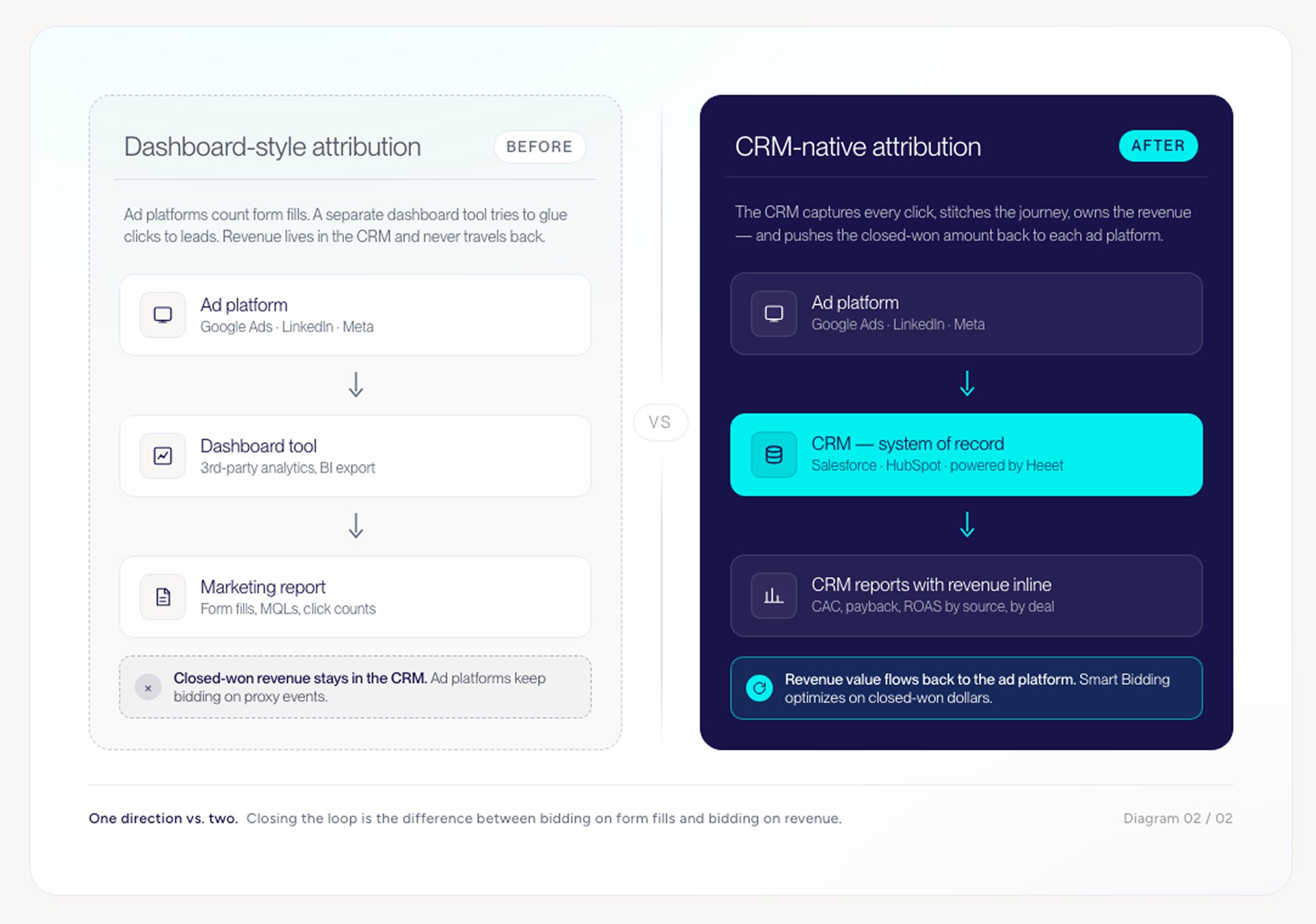
CRM-native paid attribution means the CRM (Salesforce or HubSpot) is the system that captures, stores, and manages attribution data. Ad platforms receive what they need from the CRM. Reports are built where forecasting already happens. Not in a second dashboard, nor a third-party tool, and without nightly exports that break the first time someone renames a field.
Four things have to be true for this architecture to hold:
1. Click capture at the CRM layer. Every paid click needs to land in the CRM as a tracked touchpoint on the lead or contact, the moment the visitor raises their hand and converts. Captured at the CRM layer, attached to the record that will eventually become an Opportunity. This is the prerequisite for everything else.
2. Cross-session stitching. A B2B buyer’s journey never ends on the first or last click. They see a LinkedIn ad in March, search “competitor X alternative” in April, read three blog posts in May, return on a Google retargeting impression in June, and fill the demo form in July. The CRM has to stitch those sessions into a single identity, then into a single Opportunity. Native CRM functionality usually stops at the form fill.
3. Revenue routing back to ad platforms. When the Opportunity closes, the closed-won amount must flow back to Google Ads as an Enhanced Conversion for Leads value, and to LinkedIn as a conversion through the Conversions API, with the revenue field populated. This is the closed-loop step that lets the platform algorithms bid on revenue rather than on leads. Without it, you’re still optimizing for the wrong outcome.
4. Multi-touch credit across paid and the rest of the journey. Paid is one channel. The buyer also browses organic content, the SDR’s emails, the partner referral, and downloads the analyst report. Real attribution credits are paid where earned, and credits are given to the other channels where they were earned. The model has to be multi-channel, or it isn’t a model built for B2B.
The reason CRM-native attribution beats dashboard-style attribution platforms isn’t reporting fidelity. It’s where the data lives. When attribution is housed inside Salesforce, the same record that triggers a forecast roll-up also carries the original Google Ads campaign ID. No export. No second source of truth. No team of two RevOps colleagues to keep it stitched. This is how we ensure marketing and sales argue over one number, not three.
With the model explained, let’s see how Ringover put this system to use.
How Ringover connected Google Ads spend to Salesforce pipeline (and lifted ROAS 14%)
Vincent’s team at Ringover started where most paid media managers do. The Google Ads dashboard tracked form fills. Conversions sent to Google were treated as binary events. The attribution model in the Google Ads UI was set to Data-Driven, which redistributed credit across clicks but couldn’t extend the timeline past the platform’s lookback window. Closed-won revenue lived in Salesforce. The two systems never met.
Heeet changed three things.
Cost centralized in SalesforceGoogle Ads, LinkedIn Ads, and Facebook Ads all landed inside Salesforce as Campaign records, with daily cost data attached. The marketing team stopped reconciling costs in spreadsheets and started reading them where the pipeline records lived.
Closed-won revenue flowing back to GoogleWhen a Salesforce Opportunity closed, the closed-won amount was automatically sent back to Google Ads as an Enhanced Conversion for Leads value, mapped to the original GCLID captured on the lead. Google’s bidding algorithm could now optimize for revenue, not for forms. The 14% ROAS lift came specifically from this revenue feedback. Smart Bidding had real revenue signals instead of proxy events to learn from.
Multi-touch credit is visible inside SalesforceEvery paid touchpoint sat on the Opportunity record as a Campaign Influence record. Vincent’s team could see which Google Ads campaigns contributed to which closed-won deals, what each one cost, and the resulting CAC by source, all inside Salesforce reports that the CRO already opened daily.
The revenue outcomes:
- 14% improvement in Google Ads ROAS, driven by the revenue-value feedback to Smart Bidding
- 24% increase in marketing-generated revenue attribution accuracy
- Full visibility into CAC, payback, and ROI across Google Ads, LinkedIn, and Facebook, inside Salesforce
Vincent’s own summary captures the operational shift better than any dashboard mockup:
“It’s a must-have for tracking paid acquisition and ROI in Salesforce. With Heeet, we get full-funnel visibility, tracking every lead, analyzing campaign performance, monitoring customer acquisition costs and measuring ROI across Google Ads, LinkedIn, and Facebook.”
Vincent Coulondres, Head of Growth, Ringover
How to operationalize this across Google Ads, LinkedIn Ads, and other platforms
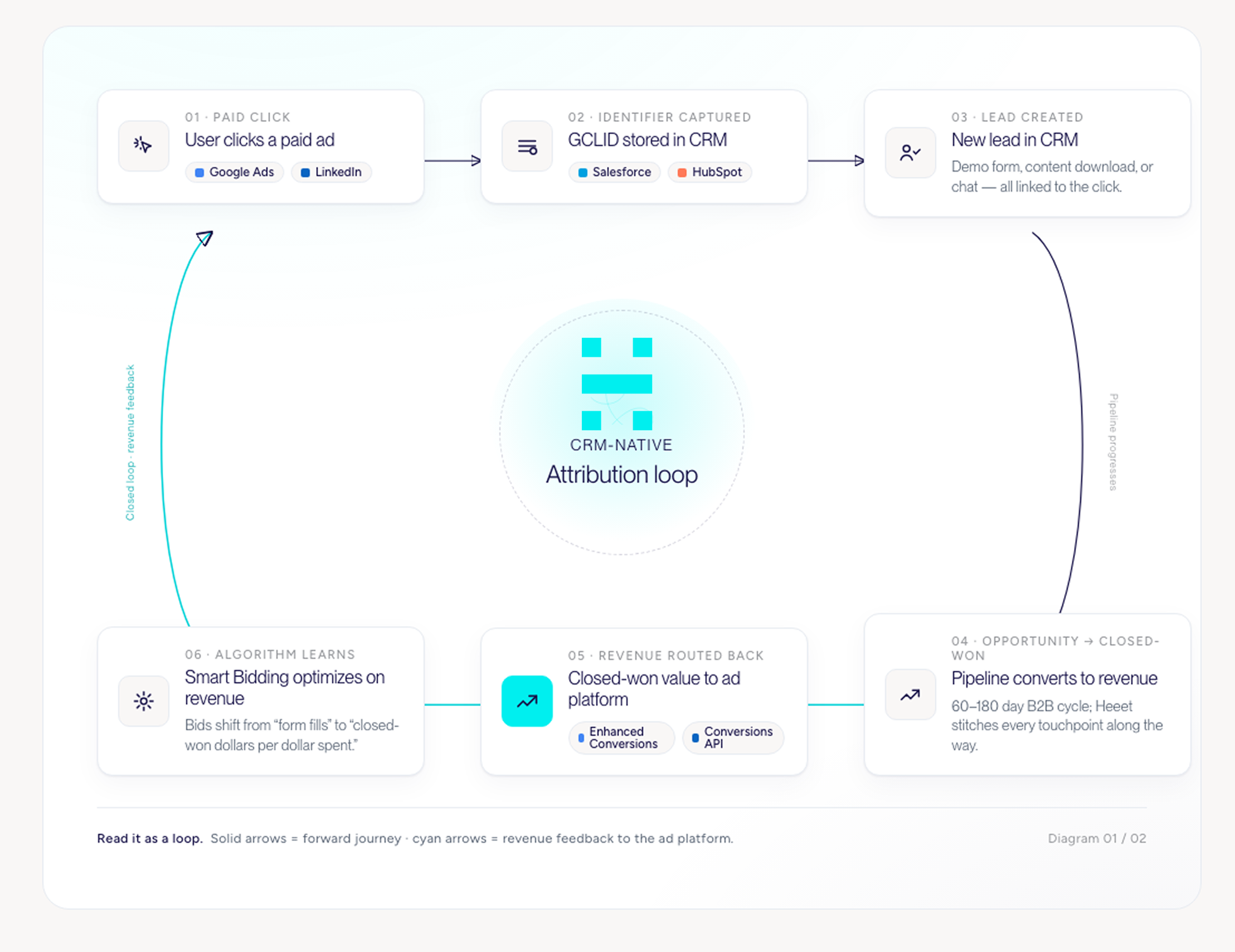
The mechanics differ by platform. The architecture stays the same in your CRM: the Salesforce and HubSpot stores touchpoint and revenue data, and the platform receives the information it needs to bid more effectively.
Google Ads
Use Enhanced Conversions for Leads with the GCLID captured on the lead record. When an Opportunity reaches closed-won in Salesforce or HubSpot, push the conversion event back to Google with the revenue value populated. Smart Bidding learns from the revenue signal rather than the lead signal. For long sales cycles, also configure a value-based offline conversion import for early signals, so the algorithm receives feedback within the GCLID retention window.
LinkedIn Ads
Use the Conversions API with the LinkedIn first-party cookie ID stored on the lead. Send the closed-won revenue value back through the API rather than relying solely on the LinkedIn pixel. LinkedIn’s pixel attribution is notoriously thin for B2B because the click-to-conversion path crosses devices and weeks. The Conversions API, plus a CRM source of truth, fixes both.
Meta and Facebook
Same pattern. Use the conversions API to send server-side CRM events and closed-won revenue values that need to be populated to optimize for revenue. Meta’s algorithm needs revenue to optimize, not events.
Organic, content, webinars, and SDR outreach
None of these has a dedicated bidding algorithm to feed. They still need to be captured as touchpoints on the lead and contact records so multi-touch credit works honestly. Otherwise, Google Ads gets credit for everything that happened after the last paid click, which is the same last-click problem in a different wrapper.
The common thread: the CRM captures and stores; the ad platforms receive audience data and bid more efficiently. Every other touchpoint is tracked and logged at the contact and opportunity level, so you can optimize your ads and the rest of the customer journey that follows.
Implementation typically runs 1 to 2 weeks for a team running paid on Salesforce or HubSpot, assuming a clean CRM and existing ad accounts. The longer end usually traces to GCLID storage cleanup and consent-mode configuration, not the integration itself.
What success looks like at 30, 60, and 90 days
A paid attribution build runs in three phases. Anyone promising full multi-touch credit on day one is selling the dashboard, not the architecture. Here’s what a realistic Heeet rollout looks like for a team running paid on Salesforce or HubSpot.
Day 0 to 30: Capture and centralize. Every paid click lands as a touchpoint on the lead or contact record in your CRM. Google Ads, LinkedIn Ads, and Meta cost data flow into Campaign records daily. The marketing team can see, for the first time in one place, what each channel costs and which leads each click produces. Reports are still mostly historical, but they’re honest.
Day 30 to 60: Close the loop. Closed-won revenue starts flowing back to Google Ads as Enhanced Conversion values and to LinkedIn via the Conversions API with revenue populated. The platform algorithms begin learning from revenue signals. ROAS calculations move from “form fills per dollar” to “closed-won dollars per dollar.” Expect Smart Bidding to take 14 to 21 days to fully recalibrate on the new signal. That recalibration window is normal.
Day 60 to 90: Multi-touch and reporting. Cross-channel touchpoints get stitched. Campaign Influence (Salesforce) or Multi-Touch Revenue Attribution (HubSpot) populates the Opportunity with paid, organic, content, and webinar credit. The CRO can open the same Salesforce dashboard as the CMO and view CAC, payback, and pipeline-by-source in a single view. Paid evaluation moves from “is this campaign converting?” to “is this campaign producing revenue at the CAC payback target?”
The first 30 days are usually the most visible internally. Suddenly, the marketing team has cost and click data attached to records that the rest of the company already reads. The CFO stops asking for spreadsheets. The change becomes operational before it becomes strategic.
Bringing it together
Paid attribution stops working when the CRM and the ad platform aren’t talking to each other. A better attribution model inside Google Ads won’t close the gap. The fix is structural: the CRM owns the touchpoints and the revenue, and the ad platforms get fed what they need to bid on the real outcome. Ringover increased Google Ads ROAS by 14% by closing that feedback loop in Salesforce. The same architecture is available to any team running paid on Salesforce or HubSpot.
If your Google Ads dashboard and your CRM keep disagreeing, book a 30-minute demo, and we’ll walk through what your version of this build looks like.
Êtes-vous prêt à suivre les prospects du lead à la clôture avec Heeet ?
Heet permet aux spécialistes du marketing et des ventes des entreprises informatiques et de sécurité de transformer leurs conjections en décisions éclairées qui génèrent des revenus tout en respectant les mêmes normes techniques de sécurité que celles que vous offrez à vos clients.