

Read time :
Ad Exposure is live: See which accounts saw your LinkedIn ad in Salesforce
Ad Exposure is live in every Heeet Salesforce org, and it fills a gap we've seen in more than a few LinkedIn ads attribution tools: it shows how many impressions from your ad campaigns your accounts were exposed to.

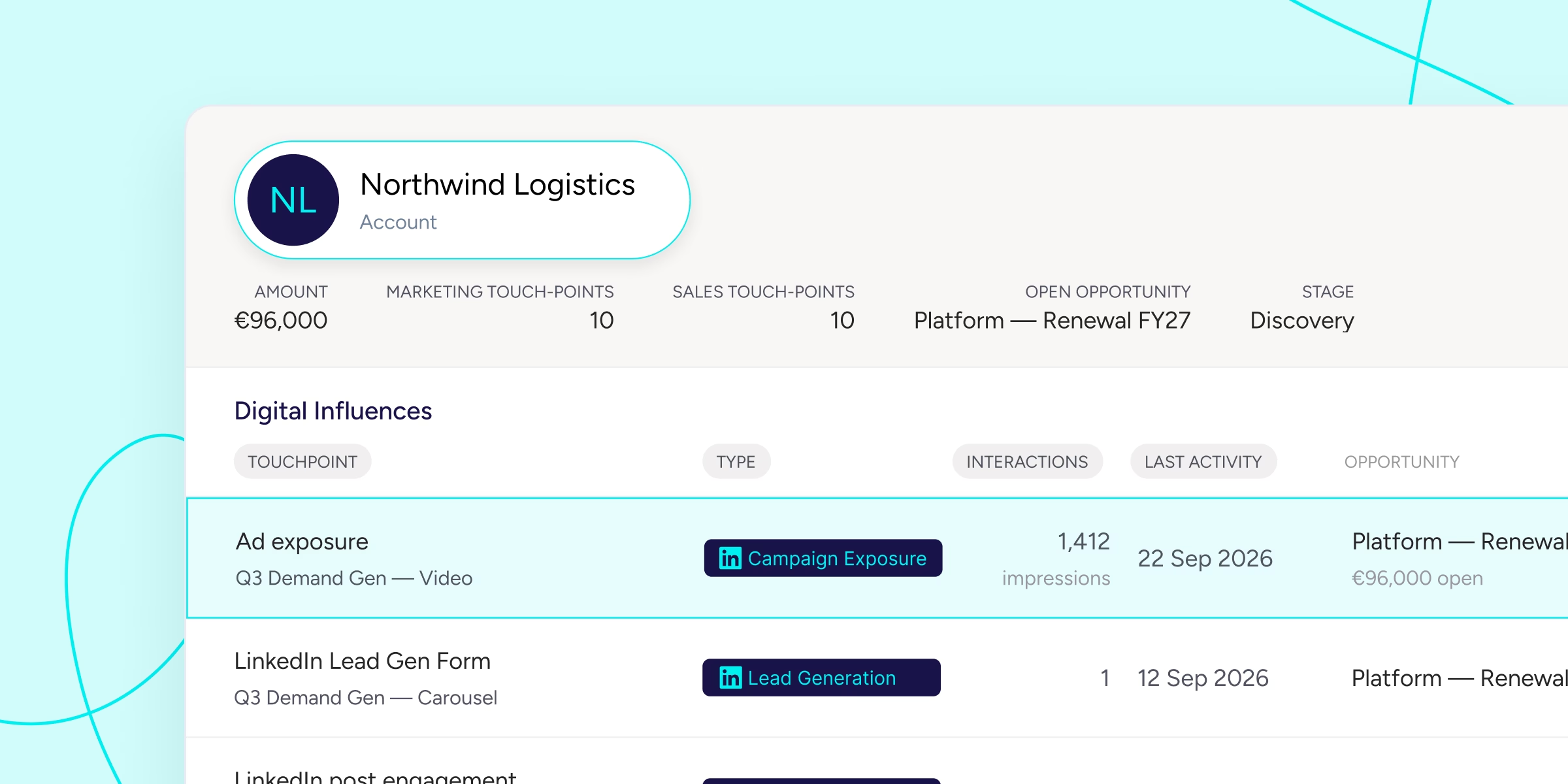

Heeet reads the impressions LinkedIn serves to companies, matches those companies to your Salesforce accounts by web domain, and writes the number into the Digital Influence related list on both the Account and Opportunity record.
You'll see which campaigns reached the account, and how heavily.
Ad Exposure is the most recent addition to our suite of LinkedIn Engagement features. Now that it's live, this is the opportunity to show you how it works alongside the entire LinkedIn Engagement feature set, so you can see what Heeet does with organic likes, comments, and shares; where each signal lands; and the actual limits in place.
Then we'll walk through what a demand generation team actually does with a list of accounts that saw the ad and said nothing.
What is LinkedIn Ad Exposure in Heeet?
Ad exposure reads the impressions LinkedIn provides to companies via the LinkedIn Company Intelligence API, matches those companies to accounts already in your Salesforce organization by web domain, and records which campaigns reached which account and how many impressions were accumulated.
It's important to note that only companies that match an account you already have produce a record. Heeet never creates new accounts from ad data. This prevents any clutter from entering your org.
The web domain, not the company name, is what connects the impression data from LinkedIn to your account. An account with an empty domain field will not match, and neither will a buyer under a parent company that uses a different domain. The situation where "Acme Group" does not match "ACME Group SAS" is exactly the problem domain resolution solves. If your CRM domain field isn't up to date, or there's an error, this won't work.
Exposure syncs are processed in a daily batch, not in real time. It is worth stating clearly since the organic aspect of this feature set relies on real-time alerts, and the two aspects are often mixed up in demonstrations.
Where does ad exposure appear on a Salesforce record?
Ad exposure appears in the Digital Influences related list on the Account record and on the Opportunity, alongside the real touchpoints Heeet already tracks. Exposure rows show the campaign, impression count, and last activity date. The attribution columns for revenue influence and cost stay deliberately empty on an exposure row.
The Digital Influence table, which shows exposure and other touchpoints, has two kinds of rows: one row represents a paid click that results in a completed form and shows both revenue impact and cost; the other is an exposure row that shows only impressions.
On the Opportunity, the same rows show which campaigns reached this account while the deal was open.
The ad exposure data is written like an object in your Salesforce org that users already have read access to. This also lets Heeet analyst agents in Salesforce and those using ClaudeForce access and use the data from their command line interface.
Why doesn't ad exposure change your attribution or your CAC?
Since exposure records are omitted from all attribution calculations in Heeet, no revenue is attributed to a campaign based on an impression, and no acquisition cost is calculated for an exposure line. Exposure can never hold the first, final, intermediate or second-to-last position on a journey, and it is never attached to a contact.
Your revenue attribution and acquisition costs stay untouched.
We see ad exposure as a signal. Heeet does not assign revenue to a campaign just because LinkedIn delivered an impression, and it will not let ad exposure take the last-touch-before-opportunity position away from a genuine touchpoint.
Impressions aren't the same as clicks and aren't priced the same way. No cost is assigned to an exposure row, so CPL and CAC remain unchanged.
What does Heeet track from organic LinkedIn engagement?
Given the news about bringing the company-level impressions from your ad campaigns into Salesforce. Here's a quick overview of what organic LinkedIn engagement Heeet already brings into your org.
Heeet brings in impressions, likes, comments, shares and clicks from your company's organic LinkedIn posts, matches the interactions to the relevant records in your CRM, and creates a Digital Influence record for the lead or contact in question.
Known contacts are linked to the content they engaged with, and new engagers can be automatically created as leads.
Connecting your accounts and capturing interactions
You can link your company's page to Heeet in just a few clicks without writing any code.
The impressions, likes, comments, shares, and clicks from your organic posts match the records already in the CRM. There are five different signal types, but they are not all equally important; for example, a comment from a director at a company which has an open opportunity is more valuable than four hundred impressions from people who will never make a purchase, which is why the data is assigned to the records rather than being displayed in a chart.
Matching it to the CRM record
Each matched interaction is recorded as a Digital Influence entry in the lead's or contact's profile in both Salesforce and HubSpot; on the account-based side, influence from multiple contacts at the same company is combined and rolled up to the account level.
Alerting the rep, then measuring the revenue
This feature allows for the creation of triggers and automations in Salesforce and HubSpot, for example, creating an alert for the sales representative when a contact from a lead engages with a post.
When a key contact interacts with a post, Sales is notified within a day instead of receiving a stale weekly summary. Marketing receives CRM-native reports on the pipeline influenced by content, deals accelerated by engagement, and leads generated from posts.
Both teams get the data they need to act accordingly.
Neither service de-anonymizes your website traffic. Journey data becomes active when someone fills out a form. This is a deliberate choice for privacy reasons, not because we forgot about the feature. Ad Exposure is the only account-level signal we can capture without identifying a human being, which is precisely why we developed it.
What do GTM teams do with the LinkedIn ad exposure data?
Here are three ways to leverage the LinkedIn Engagement feature to help reps focus their time with engaged prospects and create retargeting audiences from accounts that have already seen you.
Focusing rep time on accounts that already know you
This is as simple as creating a list for each rep that shows which accounts saw a LinkedIn Ad campaign or engaged with a company post.
Here's how to build it in your own org.
In Salesforce, select Reports, then choose New Report and select the Opportunities with Accounts report type. The expected result is a standard opportunity list, which you should already know.
Include the Heeet Digital Influence related object and filter when adding it to the exposure record type. The expected result is that the rows collapse to opportunities for accounts with at least one exposure. If no results are returned, your exposure sync has not run yet, or no account matches the criteria. Check the domain field before carrying out any other steps.
Select the filter option to show only the stages and the exposures from the past 30 days. The expected result is the current pipeline for accounts already reached. A common mistake is omitting the date filter; in that case, you'll get historical exposure for closed deals, which appears as a much higher figure and doesn't mean much when you're trying to capitalize on timely signals.
Summarise the Amount by campaign. Expected outcome: display the open pipeline per campaign based on reach, not on clicks. This is the figure anyone should see if they want to cut back on paid social or question the cold layer campaigns in your strategy.
Put it on the dashboard that your CRO currently looks at. A report that no one opens is one that no one will trust.
Writing outreach that doesn't open with a guess
The exposure data doesn't indicate which lead saw the ad. If a representative writes, "I noticed you saw our ad,, they're misusing the data and missing the signal.
The situation does allow for a reasonable assumption regarding familiarity. For an account that has reached 300 impressions in a campaign about Salesforce attribution reporting, the buying committee has become aware of both your name and how you frame your category. The campaign should focus on the problem it addresses, not on the campaign itself.
On the organic side, personalization becomes literal. A contact who commented on a post about CPL reporting three days ago is the easiest opening line a representative can have during the week, since the alert has already told them this happened.
Building retargeting audiences from the CRM out
Exposure also closes the loop in the opposite direction: after you know which accounts a campaign reached and which of those now have an open pipeline, the account list that you feed back into LinkedIn or Google ceases to be a fixed target list and becomes leads that are ready for content and messaging that brings them further down the funnel.
Exclude accounts already deep in a sales cycle, increase frequency for accounts that never converted, and create a matched audience from accounts that saw campaign A and are now in the pipeline but haven't moved.
How do you get this data out: an analyst agent, or Claude on the command line?
There are two ways to do it. Both methods involve reading the same Salesforce records. One option is to use a Heeet analyst agent that runs within Salesforce, answers questions in ordinary language, and attaches the source records to each answer. The other option is for you to connect Claude to the organization yourself, either via the Salesforce in Claude plugin or through the Salesforce MCP server in Claude Code, and then work from a terminal.
Asking an analyst agent
The agent targets your Salesforce reports and revenue objects, so exposure rows come into scope as soon as the sync takes place. This allows you to ask questions that leverage the data like:
- Which accounts were included in the Q3 ABM campaign and have an open opportunity exceeding $50K?
- Sort the open pipeline by the reach of the LinkedIn campaign over the past 60 days and show me the accounts in the top three positions.
- What about accounts with no sales activity over the past three weeks?
Every answer to these questions comes with the records, which you can view in reports your whole org has access to in Salesforce.
Working from the Claude app or the command line with Claude Code
Salesforce and Anthropic announced their partnership on 26 August 2026, and Salesforce in Claude has been available in open beta this month, with 37 prebuilt skills for meeting preparation, deal health checks, and pipeline reviews.
None of the 37 skills include marketing performance; marketing is only available through the interface, not the data, unless someone has previously mapped marketing interactions into the CRM and on the record of each lead, account and opportunity.
Here's a working sequence of prompts you can use to leverage the LinkedIn Ad Exposure data, assuming your admin has enabled the connection and has given you the right permissions:
Start by asking the question you couldn't answer last quarter: "Which LinkedIn campaigns reached accounts that now have open pipeline, and what is the total figure by campaign?"
Take that answer and ask Claude to prepare the sequence copy for the top 20 exposed accounts. Create the account list in CSV format for use with a LinkedIn matched audience. Draft a Slack message for the AE responsible for the largest exposed deal who has not had any recent activity.
Keep the prompts that have proven effective and save them as a skill, so the team can stop rebuilding the same question every quarter and stop getting a slightly different answer each time.
This month, we are having Claude review our own demo organization to generate the walkthrough screenshots. The functionality covered in the open beta is still increasing, and we'll keep testing the new features and permissions so you can start using Heeet within your GTM workflows directly in Claude.
Ready to track prospects from lead to close with Heeet?
Heeet gives marketers and sales professionals at IT & Security firms turn geuss work intro informed decisions that drive revenue while meeting the same secruity technical standards you provide your clients.