Read time :
How to Set Up a Marketing & Content Influence Timeline in Salesforce with Heeet
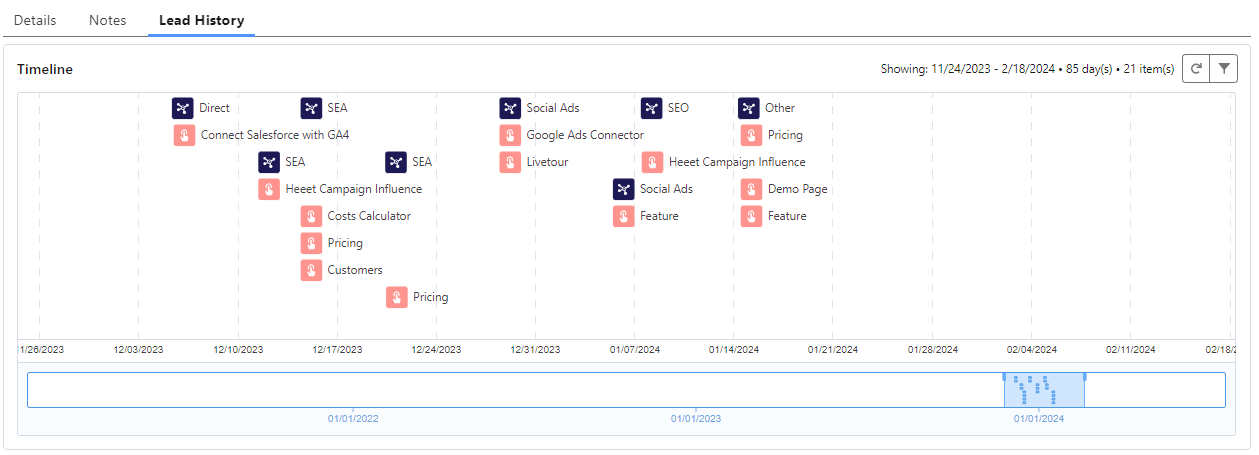
If you're using Heeet inside Salesforce, here's how to get a full marketing and content influence timeline directly on any lead, account, or opportunity record — in under 10 minutes.



What You'll Get
By combining Time Warp (a free Salesforce component) with Heeet data, your sales and marketing teams gain a single, beautifully designed view of every touchpoint that shaped a lead: which channels brought them in, which content they consumed, and when.
No more switching between tools. Everything is right there on the Salesforce record.
Prerequisites
Before starting, make sure you have:
- An active Heeet account with data flowing into Salesforce
- Salesforce Admin access (you'll need to edit Custom Metadata)
- The Time Warp AppExchange package installed (see Step 1)
Step 1 — Install Time Warp
Install the free Time Warp package from the AppExchange:https://appexchange.salesforce.com/appxListingDetail?listingId=a0N3u00000ONnm7EAD
Time Warp was created by the SalesforceLabs team. It adds a visual timeline to any Salesforce record, surfacing all related activities in chronological order.
Step 2 — Open Custom Metadata in Setup
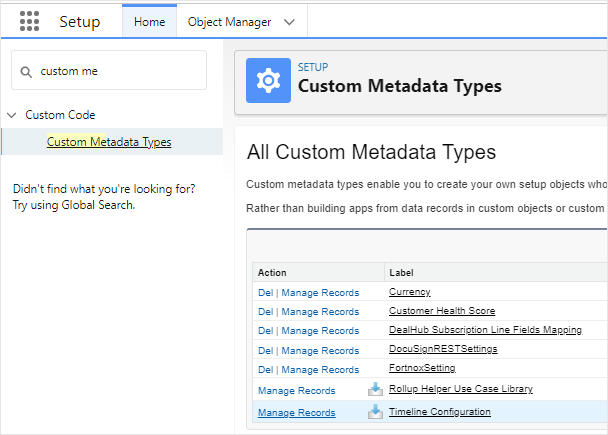
In Salesforce, go to Setup → Custom Metadata Types, then find Timeline Configuration and click Manage Records.
Step 3 — Create the "Marketing Influence" Metadata Record
Click New and fill in the following parameters:
Click Save.
Step 4 — Create the "Content Influence" Metadata Record
Click New again and fill in these parameters:
Click Save.
That's It — You're Done
You've now configured two timeline entries in Salesforce: one for Marketing Channel Influence (showing which channels touched the lead) and one for Content Influence (showing which pages or assets they engaged with, and when).
Navigate to any Lead record and add the Time Warp component to the page layout to see it in action.
Summary
Time Warp + Heeet gives your revenue team a shared source of truth on every lead's journey, directly inside Salesforce. Two metadata configurations are all it takes to surface marketing channel data and content engagement in a clear, chronological timeline — helping sales prioritise outreach and helping marketing prove impact.
Other articles
How to Have a Multi Channel Revenue Attribution in Salesforce
Heeet’s multi-channel attribution shows how SEO, Google Ads, and LinkedIn each drive revenue—going beyond first or last touch models

Salesforce UTM Tracking : How to do it in 2026
Track UTM parameters in Salesforce Web-to-Lead forms. Capture every touchpoint and use Heeet for full multi-touch attribution to revenue

MTA vs. MMM: The B2B Marketer's Guide to Making the Right Choice
Struggling to choose between multi-touch attribution and marketing mix modeling? Learn when to use each, and why the cookieless era demands a new approach.
.svg)
Ready to track prospects from lead to close with Heeet?
Heeet gives marketers and sales professionals at IT & Security firms turn geuss work intro informed decisions that drive revenue while meeting the same secruity technical standards you provide your clients.