

Read time :
What Is an Analyst Agent? Heeet's AI for Revenue Insights, Inside Salesforce
An analyst agent is an AI that reads your Salesforce revenue data and any object and tells you what's working, what's not and where to focus. See what Heeet's analyst agents do, the use cases, and setup.

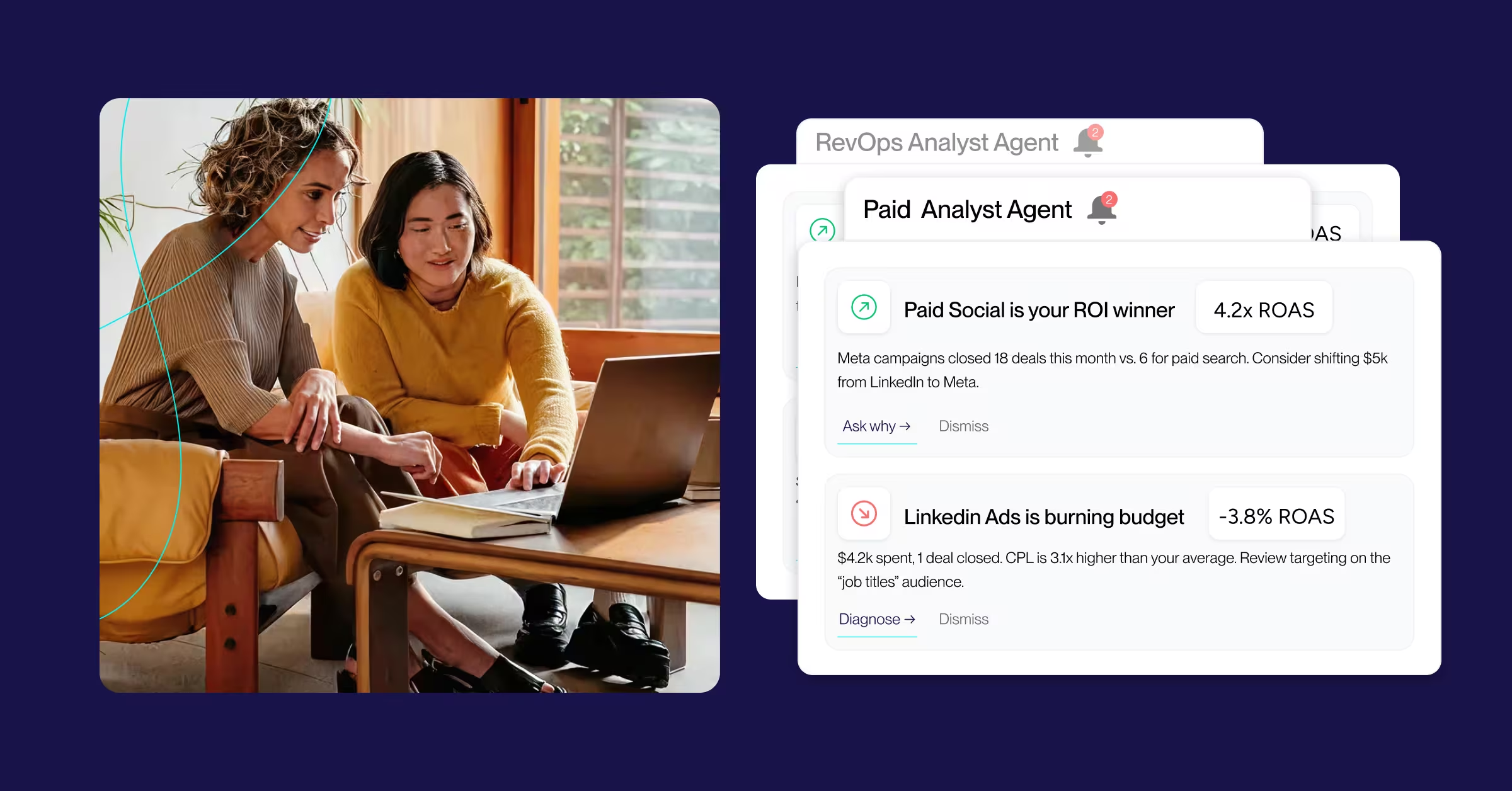

If you've found yourself in a meeting where someone asks a question about pipeline, or revenue, and you're left scrambling for the answer, and end up replying with a hunch, we've put together the solution that gives you the answer in that type of high-pressure situation.
A Heeet analyst agent is built to answer that question in the room. It's an AI-powered analyst that reads your Salesforce revenue data and tells you what's working, what to cut, and where to focus, without anyone having to export a thing.
So what is an analyst agent, really, and how is it different from the dashboard you already ignore?
What is an analyst agent in Heeet?
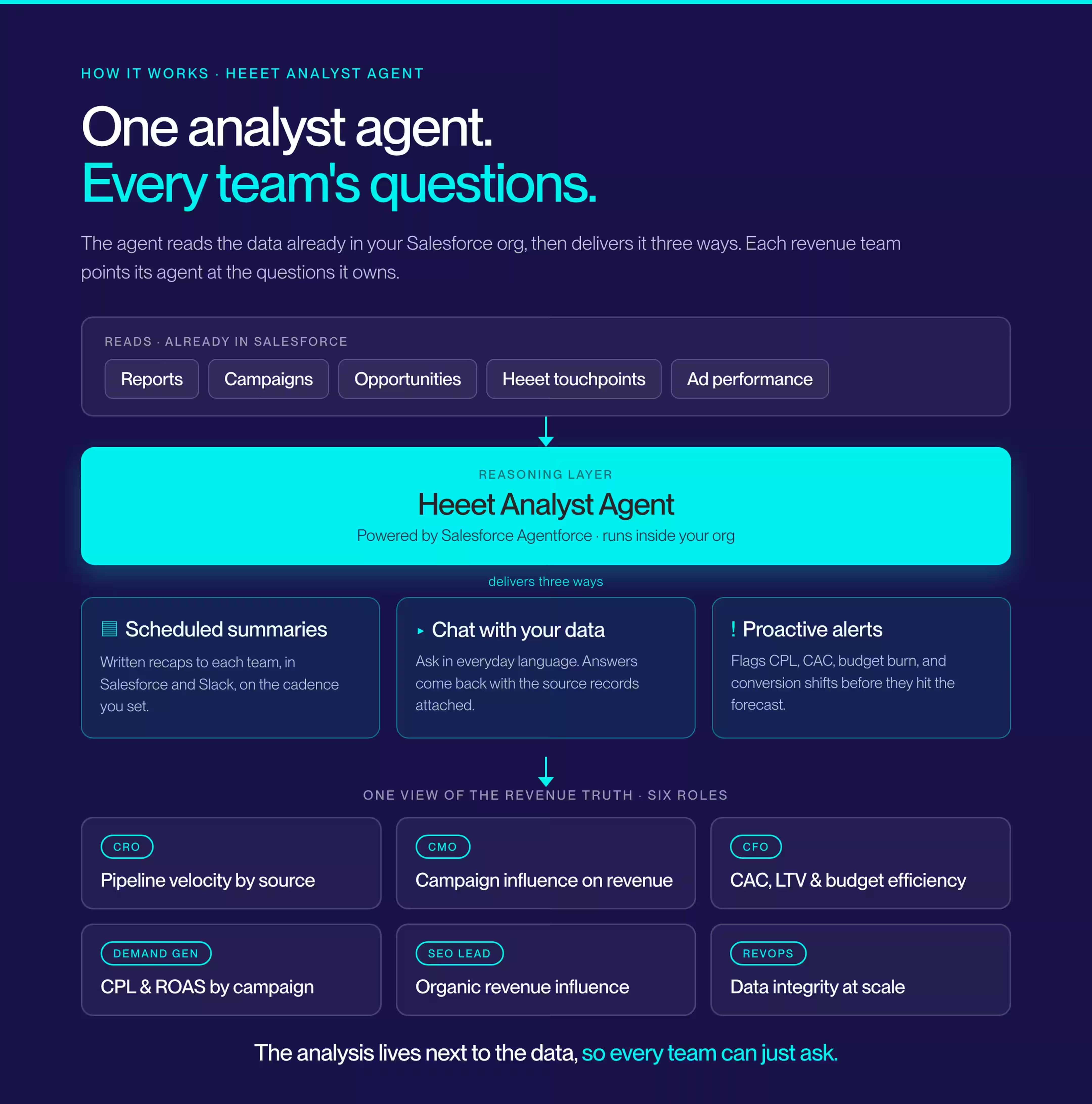
An analyst agent in Heeet is an AI assistant, powered by Heeet and Salesforce Agentforce, that reads your Salesforce reports and revenue data to generate answers. It works in three ways: scheduled summaries for each team, conversational replies to your questions, and proactive alerts when something shifts. It runs in Salesforce, so your CRM data never leaves the platform, and you can receive your scheduled insights in Slack or by email.
This isn't another dashboard. It's an analyst working with Salesforce objects to bring the number to you, explain what changed, and point to the source records so you can check their work.
That last part matters. Most AI bolted onto reporting hands you a confident sentence and no receipts. Heeet's analyst agents attach the underlying Salesforce records to every answer, because a revenue claim you can't trace is a revenue claim finance won't trust.
Each team can run its own agent, pointed at the reports and objects that matter to them. One view of the revenue truth.
What can a Heeet analyst agent do?
After running an early access program and getting feedback, we settled on the following features for the first release. A Heeet analyst agent does three jobs, all inside Salesforce:
Sends scheduled summaries
The agent analyzes the Salesforce reports tied to your objects and revenue data, then delivers a written summary to each team on the cadence you set. No one logs in to find out the quarter slipped. They receive the summaries in the channels they use day-in and day-out, like Salesforce, thier email and Slack
Answers questions on demand
Ask questions just as you would your colleague, and get the answer. The agent connects to your Salesforce reports, ad performance, and opportunity records, and replies with a data-backed answer and the source records attached. The afternoon you used to spend building a one-off report disappears.
Sends proactive alerts
The agent is always watching your reports and sends an alert the moment something moves. Whether it's your CPL that's climbing, CAC spiking, or the budget that's burning faster than planned, the alert will trigger. This ensures you hear about anomalies before the damage shows up in the forecast.
Three tasks wrapped into one job for your dedicated agent: turn the data already sitting in your CRM into a decision you can make today.
What are the main use cases for analyst agents?
Analyst agents are built around the questions each revenue role actually asks. Here are six role-based use cases we've put in place for beta testers, each targeting a different corner of the revenue picture.
Here's what each team gets, and where to go deeper:
- CRO analyst for Pipeline Velocity by Source: See which channels move deals fastest, not just which generate the most leads, without spreadsheet work.
- CMO analyst for Campaign Influence on Revenue: Multi-touch attribution that shows exactly how marketing programs contribute to closed revenue. No more guessing which campaign "influenced" the deal.
- CFO analyst for CAC, LTV, and Budget Efficiency: Acquisition cost by channel, lifetime value trends, and ROI in finance's language. Built for board decks, not marketing dashboards.
- Demand Gen analyst for CPL and ROAS by Campaign: Your Google Ads, LinkedIn, and Meta data are connected to what happens after the click, so you can see which campaigns drive pipeline and which drive leads that stall.
- SEO analyst for Organic Revenue Influence: Connect organic search to pipeline and closed revenue inside Salesforce, and prove SEO generates revenue, not just traffic numbers in Google Analytics.
- RevOps analyst for Data Integrity at Scale: Surface attribution gaps, missing campaign members, and data-quality issues before they corrupt your reports. Clean data in, accurate insights out.
The point isn't six separate tools. It's six teams reading the same revenue data and finally getting answers shaped like their own jobs.
How do you set up an analyst agent in Heeet?
Setting up an analyst agent takes the same foundation Heeet already runs on: the managed package inside Salesforce, your ad sources connected, and attribution data flowing. Once that's in place, you configure an agent per team and tell it what to watch. Here's the order it goes in.
- Install the Heeet managed package in your Salesforce org and connect your channels (Google Ads, LinkedIn, Meta, organic, events). This is what lands attribution data on your records in the first place.
- Check the data underneath. Campaign members logged, sources tagged, opportunities linked. An agent pointing at dirty reports will answer quickly and incorrectly, which is exactly why RevOps owns this step. Clean inputs first.
- Select a predefined agent or create an analyst agent for each team, and point it at the Salesforce reports and revenue objects relevant to that role. The CMO's agent watches campaign influence. The CFO watches CAC and LTV.
- Set the schedule cadence and where it lands. Daily, weekly, per meeting, delivered in Salesforce, Slack, email, or all three.
- Set your alert thresholds. Tell the agent what "something's wrong" looks like for you: a CPL ceiling, a CAC spike, a budget-pace limit, a conversion floor.
- Onboard and go live. Heeet's team walks you through the configuration during onboarding, so the agents are pointed to the right reports from day one.
Analyst agents are now available to customers, so the exact screens are covered in your onboarding session rather than left to guesswork. The most common mistake we see isn't technical. It's skipping step two. An agent is only as honest as the records it reads.
"FINALLY, a multi-touch attribution app that works. Not only does Heeet deliver on their product claims, but they also provide stellar support and direction throughout setup." That's Sara Slater-Smith at Nel, on the part of this that usually gets skipped in the brochure: the setup.
Frequently asked questions
What is an analyst agent in Heeet?
An analyst agent is an AI assistant powered by Salesforce Agentforce that analyzes your Salesforce reports and revenue data, delivering summaries, on-demand answers, and proactive alerts within Salesforce.
Is the Heeet analyst agent the same as Agentforce?
No. Agentforce is Salesforce's AI agent framework. Heeet's analyst agents are built on Agentforce and provide the attribution and revenue data, the role-based use cases, and the reporting logic that deliver answers specifically about your marketing performance.
Does my Salesforce data leave the platform?
No. Analyst agents run natively inside Salesforce. Your CRM records stay in Salesforce, which keeps your security and compliance footprint small.
What kind of questions can I ask an analyst agent?
Anything your Salesforce reports and revenue data can answer: which campaigns drove closed revenue, what your CAC is by channel, why conversion dropped last week, and which sources close fastest. You ask in everyday language and get an answer with the source records attached.
Which teams is the analyst agent for?
Six roles to start: CRO, CMO, CFO, demand gen, SEO, and RevOps. Each gets a use case shaped around the questions that role is accountable for.
How do I get an analyst agent for my team?
Analyst agents are live. Book a demo, and the Heeet team will show you how it works with your own Salesforce data.
The short version
An analyst agent gives every revenue role the one thing dashboards never could: an answer, in the moment they need it, traced back to the records it came from. Ringover, Red & Yellow, and Nel didn't get there by staring at more charts. They got there by putting the analysis next to the data and letting their teams ask them questions.
If your last pipeline review ended with "I'll pull a report and get back to you," that's the gap this closes. See an analyst agent run against your own Salesforce data.
Ready to track prospects from lead to close with Heeet?
Heeet gives marketers and sales professionals at IT & Security firms turn geuss work intro informed decisions that drive revenue while meeting the same secruity technical standards you provide your clients.