
Read time :
What is Salesforce Revenue Intelligence: understanding what it can and can’t do for your org
I’ve set up Revenue Intelligence in dozens of Salesforce orgs over the last few years, from startups with 5 reps to 400-rep enterprise sales teams. The pattern is almost always the same. Setup is fast. Adoption is hard. And about three months in, the same question lands in every executive’s inbox: “Great, we know which deals will close. But which of our marketing actually created them?”

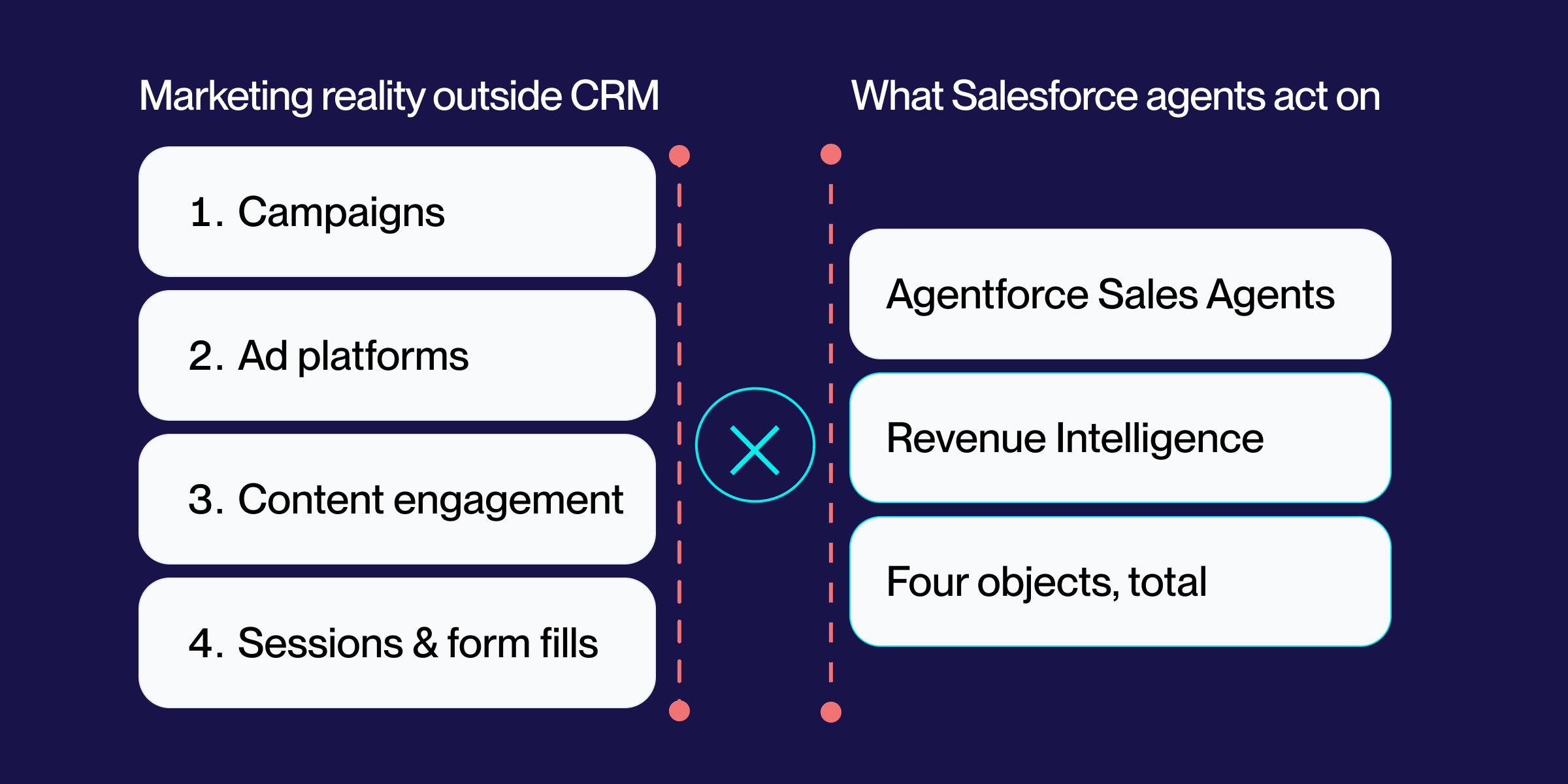

Heads up, that’s the crux of the biggest issue with Revenue Intelligence that comes to a head after setup.
It’s important to understand what it actually does and what sets it apart. Here, I’ll walk through the gotchas that aren’t in Salesforce’s docs, the mistakes I see most often during implementation, and the honest limits of the platform, including the one big blind spot that pushed me to start Heeet in the first place.
What is Salesforce Revenue Intelligence
Let’s clarify what Salesforce Revenue Intelligence is. It’s a paid add-on that bundles Pipeline Inspection, Einstein Forecasting, Revenue Insights dashboards, the Sales Rep Command Center, and Einstein Account Management into a single Sales Cloud experience. It operates on top of CRM Analytics (formerly Tableau CRM and Einstein Analytics) and reads from standard Sales Cloud objects: Opportunity, Account, User, Forecasting Item. That means several pieces to connect.
It answers three questions sales leaders ask every week:
- Which deals are at risk? → Pipeline Inspection
- How accurate is our forecast? → Einstein Forecasting
- Where are reps struggling? → Revenue Insights & Command Center
What it doesn’t answer, and this is the part most teams don’t realize until after they’ve signed the contract, is which marketing activity created or accelerated those deals. We’ll come back to that.
Important note: Revenue Intelligence ≠ Revenue Cloud
This is one of the most common mix-ups I hear on discovery calls. They’re different products, with different price tags, solving different problems:
- Revenue Intelligence = AI-powered analytics on your existing pipeline (forecasting, deal risk, dashboards)
- Revenue Cloud = CPQ + Billing + Subscription Management (quote-to-cash mechanics), now rebranded as Agentforce Revenue Management (more on that below)
- Sales Cloud Einstein = a wider bundle of AI features that overlaps partially with Revenue Intelligence.
If your AE pitches you “Revenue Cloud” or “Agentforce Revenue Management” when you asked about forecasting, slow them down. You almost certainly want Revenue Intelligence.
Key features inside Revenue Intelligence
Revenue Insights dashboards
Here you’ll find your pre-built CRM Analytics dashboards show pipeline trends, forecast gaps, win rates, and rep performance. These pull from core Opportunity, Account, and User data.
In practice, the out-of-the-box dashboards are about 70% of what most teams need. The remaining 30% is org-specific, such as customized sales process stages, multiple currencies, or product line splits, so a CRM Analytics administrator or consulting partner must extend them.
Sales Rep Command Center
This is the personalized landing page made for individual reps: their pipeline, today’s tasks, deal priorities, and Einstein next-best-actions. It’s the most underrated part of the bundle and the part with the worst adoption when teams roll it out wrong (more on that in Mistakes I see most often).
Pipeline Inspection
This feature shows week-over-week pipeline changes, flags stalled deals, highlights Einstein Deal Insights, and lets managers drill down without leaving the screen.
A key fact: Pipeline Inspection follows the forecast hierarchy (the structure used for sales forecasts), not the role hierarchy (your company’s reporting structure). If your organization’s forecast and role hierarchies don’t match, managers might not see the right deals. I’ve debugged this exact scenario multiple times.
Einstein Forecasting
Here are your machine-learned predictions for close amount and close date, alongside your collaborative forecast, so reps and managers can compare the commit vs. AI prediction.
The model trains on your closed-won and closed-lost history. No history, no useful prediction. I’ll give you my rough threshold below, but the short version is: if you’ve been live on Salesforce less than 18 months, or if you restructured your sales process in the last year, expect Einstein to be wrong for a while.
Einstein Account Management
It’s not the fun part of any software, but you’ll find the account-level engagement insights, relationship health scores, and recommended next steps all in one place. This is useful for AE-managed enterprise motion, but less useful for SMB transactional motion where the “account” is essentially the buyer.
What you need before turning on Revenue Intelligence
Edition and license requirements
- Sales Cloud Enterprise Edition or higher (includes Performance and Unlimited Editions). Professional Edition is not supported.
- Revenue Intelligence includes basic CRM Analytics features, but you may need additional licenses depending on your contract and which users need access to dashboards (data-overview screens built using CRM Analytics).
Sidebar — Pricing reality check
Salesforce does not publicly list prices for Revenue Intelligence. Your quote will vary based on your contract, your account executive’s targets, and how close you are to the end of the quarter. Usually, the price per user is comparable to that of a Sales Cloud Enterprise license. Always request a 90-day pilot before you commit.
The permission sets you actually need
This step is often unclear in setup guides. Here are the common Salesforce permission sets (preset combinations of access rights), in the order I assign them:
- Revenue_Intelligence_Admin — for whoever is configuring the org
- Sales_Analytics_User or CRM_Analytics_Plus_User — to see dashboards
- Pipeline_Inspection_User — to access the Pipeline Inspection view
- Einstein_Forecasting_User — to see AI predictions in the forecast tab
Please keep in mind that Salesforce periodically renames permission sets, and some names are not universal across orgs and packages.
In any case, end users do not need admin permissions. Give them the minimum set for what they actually do. I’ve seen orgs grant Revenue Intelligence Admin to entire sales teams “to keep things simple”—please don’t.
Data prerequisites (the part that actually matters)
Einstein’s predictions are only as accurate as your Opportunity object (the Salesforce record for each sales deal) data. Before enabling Revenue Intelligence, verify that your Opportunity records are complete, up to date, and consistent:
If you fail any of these, fix the data first. Einstein doesn’t know your data is bad; it just produces confident, wrong predictions. That’s worse than no prediction.
Mistakes I see most often
After enough rollouts, the same mistakes keep showing up. Here are the ones that cost the most time and credibility.
1. Enabling Einstein before fixing Close Date hygiene. If your reps push Close Dates a quarter at a time to keep deals “alive,” Einstein learns that pattern and predicts every deal will close 90 days later than reps say. Fix the behavior first, usually with a validation rule that requires a reason for any Close Date push beyond 30 days, then turn on Einstein.
2. Treating Pipeline Inspection as a manager tool only. The biggest adoption gains I’ve seen come from training reps to open Pipeline Inspection themselves at the start of every day. When it’s a manager surveillance tool, reps resent it. When it’s their own pipeline cockpit, they use it.
3. Confusing Revenue Intelligence with Revenue Cloud (now Agentforce Revenue Management). Already covered above, but worth repeating because it has cost teams real money. If you need quoting and billing, you need Agentforce Revenue Management (formerly Revenue Cloud). If you need pipeline analytics, you need Revenue Intelligence. They are not substitutes.
4. Misaligned forecast hierarchy and role hierarchy. Pipeline Inspection rolls up by forecast hierarchy. Reports roll up by role hierarchy. If those two trees don’t match (which is very common after re-orgs), managers will see different deal sets in different tools and lose trust in the data. Audit both before going live.
5. Re-defining stages mid-year. Einstein trains continuously. Renaming “Negotiation” to “Final Negotiation” mid-quarter resets pattern matching and degrades accuracy for weeks. If you must change stages, do it at the start of a fiscal year. Unfortunately, this is mostly a “wait for retraining” situation as support has limited ability to intervene.
6. Forgetting multi-currency setup. If your org runs multi-currency, Einstein Forecasting needs corporate currency configured correctly and current, dated exchange rates. Skip this, and your USD forecast will silently mix in unconverted EUR amounts. I’ve seen this make a forecast look 15% better than it actually is.
7. Granting CRM Analytics Plus to everyone “to be safe.” Those licenses are not free. Provide them to those who actually need to view dashboards, not by org-wide default.
What Salesforce’s docs don’t tell you
A few things I’ve learned the hard way that aren’t in the official documentation, or are buried so deep you’ll never find them.
- Einstein Deal Insights only fires on opportunities that meet minimum age and activity thresholds. A brand-new opportunity created yesterday won’t contain insights yet. This is by design, but it confuses everyone the first time they look.
- CRM Analytics datasets have a row limit per dataflow run. Huge datasets can hit processing or performance limits depending on your CRM Analytics capacity.
- Pipeline Inspection’s “stalled” definition is configurable but defaults to no activity in the current stage for a stage-specific window. If you don’t tune this, you’ll either over-flag (every deal is stalled) or under-flag (nothing ever shows up). Tune it per stage.
- Einstein Forecasting respects opportunity splits only if they are configured before model training. Add splits to an existing org, and you’ll need to wait for the next training cycle for predictions to reflect them.
- You cannot use Revenue Intelligence with custom Person Account configurations without further setup. If you’re a B2C-flavored B2B org running Person Accounts, expect extra config work.
- The “data freshness” indicator in Revenue Insights tells you when the dataset was last refreshed, not when the underlying Opportunity record was last updated. A green “fresh” indicator can still hide stale rep behavior.
Best practices for Revenue Intelligence success
Clean opportunity data before launch, not after. Run a 30-day data hygiene sprint before enabling Einstein. Validation rules, required fields, and manager spot-checks. The goal is not perfect data; the goal is consistent enough data that AI predictions are believable.
Train reps on Pipeline Inspection as their own tool. The fastest way to kill adoption is to position it as “how your manager will track you.” Position it as “your pipeline cockpit.” Show them how to use the deal insights themselves before any manager reviews them.
Map Einstein’s predictions to your actual stages. If your “Negotiation” stage means “verbal yes, awaiting paperwork,” tell your team that’s what Einstein is reading. Calibrate expectations accordingly. The AI doesn’t know your stage names; it knows your historical patterns.
Embed Revenue Insights into existing rituals, not new ones. Don’t create a “Revenue Intelligence Review.” Pull up the dashboards in your existing Monday forecast call. New tools added to existing meetings get adopted. New meetings created around new tools get cancelled within a quarter.
Re-baseline after major changes. New CRO, new product, new pricing model, re-org? Plan for 4-8 weeks of degraded Einstein accuracy and tell stakeholders to expect it. Setting expectations is half the job.
The limits of Salesforce Revenue Intelligence
Data volume and processing
CRM Analytics has platform limits on the number of dataset rows per dataflow run and on the dataflow execution frequency. Large orgs (1M+ opportunities, complex object relationships) routinely hit these limits and need to filter datasets, partition by region or business unit, or schedule dataflows for off-hours execution.
If you’re approaching enterprise scale, plan to include a CRM Analytics specialist on your implementation team. The dashboards do not “just work” at that scale.
Einstein Forecasting accuracy thresholds
My rough rules of thumb from the orgs I’ve worked in:
- <300 closed-won opportunities/year: Einstein predictions are too noisy to be useful. Stick with collaborative forecasting.
- 300-1,000 closed-won opportunities/year: Predictions become directionally useful after 3-4 months of training.
- 1,000+ closed-won opportunities/year with consistent stage usage: Predictions become genuinely valuable within 2-3 months and often beat rep commitment on accuracy.
Marketing attribution blind spots
Here is the limit that eventually pushed me to start building Heeet.
Revenue Intelligence answers which deals will close. It does not answer which marketing created or influenced those deals. There is no campaign attribution surface inside Pipeline Inspection. There is no channel to revenue widget in Revenue Insights. Einstein Forecasting does not factor marketing-sourced touchpoints into its predictions because that data simply isn’t there in a usable form. And, as noted above, none of the Agentforce Sales agents fix this—they act on the same data Revenue Intelligence already sees.
For B2B revenue teams that want full-funnel visibility (which campaigns sourced this pipeline, which content moved deals through stages, which channel produced the highest-LTV customers), Revenue Intelligence is half the picture.
Sales analytics and marketing attribution are different jobs. Salesforce ships the first natively. The second has historically required either a separate platform (with all the data export and reconciliation pain that implies) or a custom build inside Salesforce.
Comparison: Revenue Intelligence vs. Sales Cloud Einstein vs. Agentforce Revenue Management
The three products are most commonly confused on Salesforce sales calls. Quick orientation:
If your AE quotes you a bundle, ask which of these three things you’re actually paying for. The overlap between Revenue Intelligence and Sales Cloud Einstein is real, and you should not be paying for both unless you’ve explicitly mapped which features each is providing.
The evolution of Revenue Intelligence in the Agentforce era
Revenue Intelligence didn’t show up fully formed. Salesforce first announced it in February 2021 as a unified bundle of Sales Cloud and CRM Analytics, positioned as a “command center for revenue management.” Pipeline Inspection and Einstein Forecasting were rolled into the same SKU shortly after, and Einstein Account Management was added to provide account-level signals.
For the first couple of years, the value proposition was straightforward: surface insights that sales leaders could act on, embedded inside Sales Cloud.
The inflection point began in 2023, when Salesforce began integrating generative AI into the flow of work. The framing shifted from “dashboards that surface insights” to “AI that drafts emails, summarizes calls, and suggests next steps.” Ketan Karkhanis, EVP and GM of Sales Cloud, captured the strategy at the time with the line: “When it comes to sales, AI is the new UI.”
Then came Agentforce. Salesforce launched it at Dreamforce 2024, with general availability at the end of October 2024, framing it as its autonomous-agent platform. At Dreamforce 2025, the company made two announcements that matter for anyone evaluating Revenue Intelligence today.
1. Revenue Cloud was rebranded as Agentforce Revenue Management. This is the quote-to-cash product — CPQ, Billing, Subscription Management. It is the same product I mentioned at the top of this article. If you’ve read coverage of “Agentforce Revenue Management” and assumed it replaces Revenue Intelligence, it doesn’t. Different product. Different problem. Different price tag. (Salesforce CPQ also reached End of Sale in Q1 2025, which is the migration story this rebrand is really about.)
2. Salesforce rolled out Agentforce Sales agents. Sales Coach Agent, Sales Development Agent (SDR), Prospecting Agent, and others all sit on top of the same Opportunity, Account, and Activity data that Revenue Intelligence reads. These agents are sold separately, mostly on consumption-based pricing — Flex Credits or per-conversation — rather than the per-user licensing model used for Revenue Intelligence.
So, as of early 2026, the actual lay of the land:
- Revenue Intelligence is still its own SKU. Pipeline Inspection, Einstein Forecasting, Revenue Insights, and the Sales Rep Command Center continue to ship under that brand. The Salesforce.com pricing page still markets it as a premium analytics add-on.
- Agentforce Revenue Management is the rebranded Revenue Cloud (CPQ/Billing). It is not where Revenue Intelligence went.
- Agentforce for Sales is the new layer. The agents are additive; they execute on insights that Revenue Intelligence already surfaces, not a replacement for the analytics underneath.
What this means for existing Revenue Intelligence customers
Three practical implications.
Revenue Intelligence isn’t going away. If you bought it in 2022 or 2023, there's no requirement to migrate. Pipeline Inspection, Einstein Forecasting, and Revenue Insights remain core Sales Cloud surfaces and continue to ship release updates.
The agent layer is additive, not a substitute. Sales Coach Agent doesn’t replace Einstein Forecasting — it sits next to it and tries to act on insights the model already produces. If your reps weren’t using deal-risk signals before, an agent surfacing those same signals in a Slack DM is unlikely to change behaviour on its own. The underlying data quality and stage hygiene still decide whether any of this works. Plan for the agent rollout in the same way you’d plan for the original Revenue Intelligence rollout: 30 days of data audit before you turn anything on.
Your AE will pitch you Agentforce. Consumption-based pricing (Flex Credits, per-conversation models, per-agent licensing options) is genuinely new and makes it easier to start small than the old per-user model. But Marc Benioff acknowledged at Dreamforce 2025 that Agentforce adoption sits around 8% of Salesforce’s installed base, roughly 12,000 of 150,000 customers. You are not behind if you haven’t bought in yet. Most of the market is still in pilots.
What this means for new orgs evaluating implementation
If you’re standing up Salesforce in 2026 or migrating from another CRM, the decision is no longer “do we buy Revenue Intelligence?” It’s “what mix of Revenue Intelligence and Agentforce Sales agents fits where we are today.”
A reasonable default for most B2B revenue teams:
- Buy Revenue Intelligence as the analytics foundation. Pipeline Inspection and Einstein Forecasting still produce the views your VP of Sales runs forecast calls from. Without the analytics layer, the agents have nothing useful to act on.
- Hold on Agentforce Sales agents until you have 6+ months of clean Opportunity data. Agents act on the data that’s there. If your stage definitions, Close Date hygiene, or activity capture are inconsistent, an agent will execute on bad assumptions faster than a human would.
- If you pilot Agentforce, pick one agent with a clear use case. Prospecting Agent on inbound MQLs is the most contained. Sales Coach Agent on a single segment of your sales team is the next-most-contained. Don’t turn on three agents simultaneously and hope.
The blind spot Agentforce doesn’t fix
Worth saying out loud, because it’s the part Salesforce’s keynote doesn’t dwell on: none of the Agentforce Sales agents close the marketing attribution gap. Sales Coach Agent coaches on deal mechanics, not on which campaign sourced the deal. Prospecting Agent prioritizes accounts from CRM patterns, not from marketing engagement data that isn’t sitting in Salesforce in the first place. The agents make Revenue Intelligence faster to act on. They don’t change what Revenue Intelligence sees. The marketing-to-pipeline question is still unanswered by anything in the bundle. We’ll come back to that in Known limits.
Why I built Heeet (and how it fits next to Revenue Intelligence)
Regardless of how the future gets packaged into the constant evolution of Salesforce products, after enough Revenue Intelligence rollouts, I’m certain you’ll end up having the same conversation regarding revenue. The CRO would log into the new dashboards, see beautiful pipeline analytics, and ask: “OK, but which marketing actually made this pipeline?” And the answer was always either “we don’t know” or “let us export to a spreadsheet and stitch it together for two days.”
The standard fixes were all bad. Bolt on a third-party attribution platform, and you’d spend three months syncing data back and forth. Build it custom in Salesforce, and you’d spend nine months and need an admin to maintain it forever. Either way, marketing attribution lived outside the dashboards sales actually used, which meant nobody used it.
Heeet exists because I wanted attribution to live in the same place as Revenue Intelligence, inside Salesforce, on the same Opportunity records, visible in the same dashboards, with no separate login. Touchpoints get captured automatically, attached to opportunities natively, and you can build CRM Analytics widgets that sit alongside your Pipeline Inspection view.
If you’re rolling out Revenue Intelligence and the question “which marketing made this pipeline?” is going to come up within the next quarter, and it will, book a Heeet demo and we’ll show you what it looks like inside your own Salesforce instance.
Other articles

15 B2B Revenue KPIs Every Revenue Leader Should Track
Track the B2B revenue KPIs that predict growth–pipeline velocity, CAC, NRR, win rate, and more. Formulas, benchmarks, and dashboard tips.
Best Attribution Software for B2B in 2026: 11 Tools Compared
We tested 11 B2B attribution platforms on pricing, CRM fit and attribution models. See which tool suits your stack — and what each really costs.
Revenue-Based Lookalike Audiences: Build Ads from CRM Data
Learn how to build higher-converting lookalike audiences using closed-won CRM revenue data instead of leads. A step-by-step guide for B2B GTM teams.
.svg)
Ready to track prospects from lead to close with Heeet?
Heeet gives marketers and sales professionals at IT & Security firms turn geuss work intro informed decisions that drive revenue while meeting the same secruity technical standards you provide your clients.