

Read time :
Closed-lost reactivation: re-open lost deals the moment they come back
Closed-lost reactivation on a real signal: Heeet writes the return visit onto the Contact, Claude reads the loss reason, lemlist sends the follow-up.


Last updated: 20 October 2026
Closed-lost is a stage, not a verdict.
Salesforce treats it as the end of the record. The Opportunity closes, the reason gets a picklist value, and the contacts vanish from every queue. Then, eight months later, one of them spends six minutes on your pricing page on a Wednesday afternoon. The only system that notices is your web analytics, which has no idea who she is and no idea she once said no.
Heeet's tracker does know, on one condition: she has to be identifiable. Because the tracking is cookieless, a journey is held in the visitor's own browser and written to Salesforce only once the person is known. A contact who converted on this laptop last year, who clicks a tracked email, who registers for a webinar or comments on a LinkedIn post: each of those writes a fresh influence record onto a closed-lost Contact the same day. Someone browsing anonymously from a new device stays invisible, and no cookieless tool will tell you otherwise. When the signal does fire, Ringover's case study gives you the size of the prize: 33% of the leads who visited its pricing page became sales opportunities.
Closed-lost reactivation, then, is a daily query rather than a quarterly campaign. Michel Lieben's version, Play 5 in ColdIQ's September 2026 deck of 26 GTM plays, buys the signal from outside: funding and hiring data from PredictLeads, a technology change from BuiltWith, a call-recording agent that extracts the real objection. Good play. This one starts with the signal your own CRM generated for free, because the person came back on her own. It's the query, the read of the loss reason, and the lemlist sequence that follows.
What do you need to run this play?
The deal owner acts. RevOps writes the query once. About 45 minutes to set up, five a day to run.
- Heeet installed, with content tracking, email engagement and LinkedIn engagement on, and Lead Intelligence on your Contact and Account layouts.
- Claude connected to Salesforce: Salesforce in Claude, or Claude Desktop or Claude Code with the Salesforce Hosted MCP server (
sobject-reads). - The lemlist MCP at
https://app.lemlist.com/mcp, with a "Reopen" campaign built: one email, one LinkedIn touch, one follow-up, generous gaps. - Slack, so the owner can claim the reply personally instead.
What signal does this play run on?
An Opportunity closed-lost within the last 18 months, and a new Heeet influence in the last 24 hours on a Contact at that Account. Four kinds count: a page view or download (pricing, security and comparison pages weigh most), an email click, a webinar or event registration recorded as campaign membership, and a like or comment on one of your LinkedIn posts. LinkedIn ad exposure doesn't count. If your campaigns reach a lost account, Heeet records it on the Account, but an impression is your ad finding them, not them coming back. Next to the signal sit the things the CRM already knew: the Loss Reason, the close date, the amount, the last activity before it went quiet.
The Loss Reason is the part most teams underrate. It's the only field in the CRM that records why the buyer said no, in the rep's words. It's also what turns a return visit into a specific sentence rather than a check-in.
Where each person sees it
| Who | Where they work | What Heeet gives them |
|---|---|---|
| RevOps or the sales manager | Claude, connected to Salesforce | Every lost-deal contact who came back in the last 24 hours, with the loss reason beside it |
| Deal owner | Slack, then the Salesforce Contact | The alert, the draft opener, and the Lead Intelligence summary of what she did |
| Deal owner, again | lemlist | The person loaded into "Reopen" with the blocker and what changed, waiting for a human to start it |
| Sales leadership | The reopened Opportunity | The return visit that started it, credited on the deal |
How do you run closed-lost reactivation?
Step 1: the daily query
Find Opportunities closed-lost in the last 18 months. For their Accounts, list
every Contact (and any Lead sharing the Account's email domain) with a Heeet
influence created in the last 24 hours. Return: person, title, Account, the
lost Opportunity (amount, close date, Loss Reason, owner), the new influence
(type, page or post or campaign, time), and any other influences on the
Account in the last 30 days. Do not count LinkedIn ad exposure records as a
new influence. Exclude Accounts with an Opportunity currently open, and
Opportunities lost fewer than 90 days ago.
Expected output: on most days, zero to five people. That's the right size. The play is about acting on each one properly. Volume was never the point.
Step 2: read why it was lost
For each result, summarise in two lines: the Loss Reason in the picklist, what
the last three Activities and notes say the real blocker was (price, timing,
competitor, no decision), and who at our company owned the deal. Add whether
our LinkedIn ads have reached the Account in the last 30 days, as context only.
Step 3: what changed, on both sides
The owner opens the Contact and reads the Lead Intelligence summary: everything she has done with you since the deal closed, the recommended next step and the talking points. That's the record of what she's looking at now.
For what changed at her company, ask Claude to search the web:
For each Account in the results, search the web for news since the lost
Opportunity's close date: funding, leadership changes, acquisitions, new
product lines, hiring for the role that owned the deal. One line per item,
with the source and date. Say "nothing found" rather than guessing.
That's public web data, not CRM data, and it's free. It gives the opener a second sentence that isn't about you.
Step 4: classify the trigger
Pricing, security or comparison page, or two visits in seven days: high. Webinar registration or an email click on a product update: medium. A single blog read: low, wait for the next signal. A LinkedIn comment: no sequence at all. The owner replies to the comment as a person.
Step 5: write the reopen line
For each high or medium person, draft a two-sentence opener. Sentence one
names the blocker from the Loss Reason in their words ("when we spoke in
March, pricing on the mid tier was the sticking point"). Sentence two names
what changed since, on our side or theirs, and only where we can point to a
record or a dated source for it. No "checking in". No mention of the page they visited.
The second rule matters. A buyer who is told you saw her on the pricing page stops visiting the pricing page.
Step 6: load lemlist, don't start it
Using the lemlist MCP, add these people to the campaign "Reopen" with the
variables blocker, what_changed and owner. Do not start the campaign. Return
the count added.
Step 7: tell the owner
One Slack message per person: who came back, what they did, the lost deal, the draft opener and a link to the Contact. The owner reads the Lead Intelligence summary there, then sends through lemlist or picks up the phone. Either way, the record on the Contact now shows the return visit and the response.
Step 8: measure it monthly
List Opportunities created in the last 90 days on Accounts whose Contacts were
added to "Reopen". For each, show the influences on the Opportunity, including
the return visit that triggered the play, and compare the win rate to the
account-wide average for the same period.
Because Heeet attaches account-level influence to an Opportunity opened within your configured window, the reopened deal carries the marketing credit for the return visit that started it.
Which returning visitors get a sequence, and which get a call?
High triggers get the sequence the same day, with the owner copied. Medium triggers get the sequence if the deal was worth more than your median, and a Slack nudge if it wasn't. Low triggers wait. Anyone lost fewer than 90 days ago is too recent for anything but a personal note, and any account with an Opportunity already open belongs to whoever owns it. Customers never appear in the query, because the Account filter excludes them.
Why does a return visit beat a win-back campaign?
Deals are lost on a blocker and a date. Both move. Budget cycles reopen, the competitor underdelivers, the champion changes role, your roadmap ships the missing feature. The return visit is the buyer telling you one of those things happened. A sequence that names the original blocker and what changed reads as memory rather than persistence, and memory is rare enough in B2B sales that it gets replies.
How do you make it recurring?
Schedule the query for 08:30 every weekday and the Slack posts right after. Run the Step 8 report on the first Tuesday of the month and put the reopened pipeline in the weekly digest (Play 7). Once a quarter, audit the Loss Reason picklist itself. A play that reads loss reasons is only as good as the reasons reps entered, and "Other" isn't a reason.
Related
- Plays: Warm outbound to LinkedIn engagers (Play 1) · CRM retargeting for stalled pipeline (Play 4) · Alert the owner when a known contact reads your pricing page (Play 14) · Flag deals going quiet (Play 19)
- Features: Customer Journeys · Lead Intelligence · Multi-touch tracking and attribution · LinkedIn Engagement
- Reading: Analyze the sales and marketing journey in Salesforce · Display related leads in Salesforce
FAQ
Does this catch a lost contact browsing anonymously?
No. Cookieless tracking writes a visit to the CRM only when the visitor is identifiable: the browser that converted before, a tracked email click, a new form, a registration, a LinkedIn engagement. Anyone else stays anonymous, by design.
Do LinkedIn ad impressions trigger the play?
No. Heeet records account-level LinkedIn ad exposure on the Account, but the query leaves it out. An impression means your ad found them. The play waits for them to come back on their own.
How far back should the query look?
Eighteen months by default. Set it to your buyers' budget or renewal cycle instead if you know it.
Does lemlist write anything to Salesforce?
Not in this play. The sequence runs in lemlist; Salesforce stays read-only through the sobject-reads server. Log the reply as an Activity and Heeet records it as a sales-driven influence.
What if the Loss Reason is blank or "Other"?
Then Step 2 has nothing to work with and the opener becomes generic. Make Loss Reason required at close and audit the picklist quarterly. Play 8 covers the wider hygiene check.
Will the reopened deal show marketing influence?
Yes. The return visit is an influence on the Account. An Opportunity opened within your window inherits it. The credit sits on the deal rather than in a spreadsheet.
Other articles

Warm Outbound to LinkedIn Engagers Already in Your Salesforce
A warm outbound play: find the LinkedIn engagers already in Salesforce, read their journey, write from the post they engaged with and retarget the quiet ones.
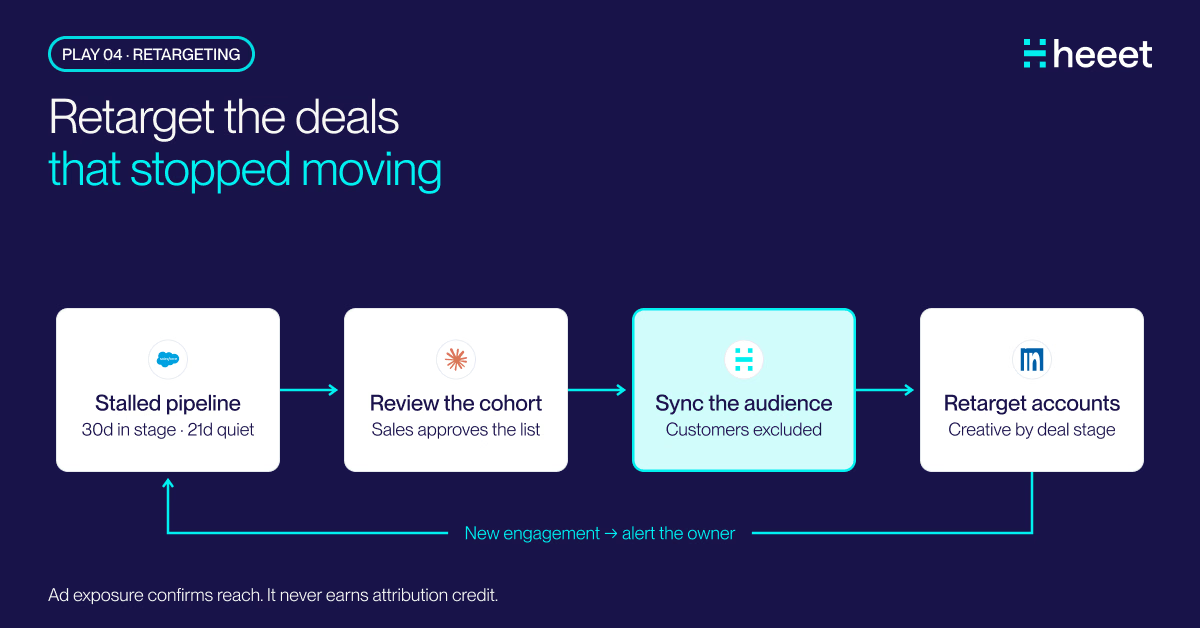
CRM Retargeting: Stalled Pipeline to a Live LinkedIn Audience
CRM retargeting for stalled deals: Claude finds the opportunities that stopped moving, Heeet keeps their accounts in a live LinkedIn audience, customers out.

Claude for Sales: Pre-Call Brief With the Buyer Journey
Claude for sales preps the call from CRM data. One more prompt adds the buyer journey Heeet writes to the same records, for the whole buying committee.
.svg)
Ready to track prospects from lead to close with Heeet?
Heeet gives marketers and sales professionals at IT & Security firms turn geuss work intro informed decisions that drive revenue while meeting the same secruity technical standards you provide your clients.