Read time :
What Is a Salesforce Campaign Object? Heeet's Complete Guide for B2B Marketers
The Salesforce Campaign object is a CRM record that tracks every marketing campaign you run and ties it to the leads, contacts, and opportunities it influences. It's the bridge between "we ran a campaign" and "this campaign drove $200K in pipeline."


Most B2B teams don't use it that way. Their Campaign tab becomes a graveyard of inconsistent names, half-populated fields, and no visibility into what drove revenue. A CMO asks which webinar built pipeline last quarter; the answer comes back as a screenshot of a Google Sheet pieced together from three other tools.
This guide is by the team at Heeet, the marketing intelligence platform built natively inside Salesforce and HubSpot. We help B2B teams turn the Campaign object from a list of names into a campaign attribution engine, without exporting data, without weeks of implementation, and without giving up GDPR compliance.
Below, you'll find how the Campaign object works, how to set it up properly, what Campaign Members and Campaign Hierarchy are for, why Campaign Influence trips up so many teams, and how to build reports that finally connect marketing to revenue. By the end, you'll know where Salesforce stops and where you need more.
What is the Salesforce Campaign object?
The Salesforce Campaign object is a standard CRM object that tracks and manages marketing activities like email campaigns, webinars, trade shows, paid ads and content programs. Each Campaign record stores details such as budget, expected revenue, start/end dates and campaign type, while linking directly to the Leads and Contacts who participated.
Think of the Campaign object as the central container that connects your marketing efforts to people in your CRM. Without it, your Leads and Contacts exist in a vacuum. You can see who they are, but not which marketing activity brought them in or influenced their decision.
Salesforce organizes Campaign data through several related objects:
- Campaign stores the marketing activity details (name, type, status, budget, dates)
- Campaign Member is the junction object that connects a Lead or Contact to a specific Campaign
- Campaign Member Status tracks engagement level (e.g., "Sent," "Responded," "Attended")
- Campaign Influence links Campaigns to Opportunities to measure revenue impact
Every B2B marketing team using Salesforce should have Campaigns as a foundational piece of their reporting infrastructure. According to Salesforce's own documentation, the Campaign object supports hierarchical structures up to five levels deep, making it flexible enough for complex program tracking.
The challenge? Most teams either underuse Campaigns (creating them sporadically) or overcomplicate them (building hierarchies so deep that reporting becomes meaningless). Getting the setup right matters more than most people think.
To connect Campaigns to real revenue outcomes, the Salesforce marketing intelligence setup keeps reporting CRM-native.
How do you create a Salesforce Campaign?
Creating a Salesforce Campaign takes four steps: enable Marketing User permissions, navigate to the Campaigns tab, fill in the Campaign fields and define your Campaign Member Statuses. The entire process takes less than five minutes once permissions are configured.
Here's the step-by-step:
Step 1: Enable Marketing User Permissions
Your Salesforce admin needs to check the "Marketing User" box on your user profile. Without this, you won't see the Campaigns tab or have permission to create new records. This is the most common reason marketers can't access Campaigns in their org.

Step 2: Navigate to the Campaigns Tab
In Salesforce Lightning, click the App Launcher (nine-dot grid icon) and search for "Campaigns." If you don't see it, your admin may need to add it to your app navigation.

Step 3: Fill in Campaign Details
Click "New" as seen in the image above and complete these fields:
- Campaign Name: Follow a consistent naming convention. A proven format is:
[Year]-[Quarter]-[Type]-[Name](e.g., "2026-Q1-Webinar-Attribution Masterclass") - Type: Select from standard types (Email, Webinar, Conference, Advertisement) or custom types your admin has created
- Status: Set to "Planned," "In Progress," or "Completed"
- Start/End Dates: Define the campaign's active window
- Budgeted Cost: Enter your planned spend for ROI tracking
- Expected Revenue: Set a benchmark for performance comparison

Step 4: Configure Campaign Member Statuses
Default statuses are "Sent" and "Responded." Customize these based on your campaign type:
- For webinars: Invited → Registered → Attended → No Show
- For events: Invited → Registered → Attended → Visited Booth
- For email campaigns: Sent → Opened → Clicked → Converted
Strong naming conventions from day one will save your reporting team hours of cleanup later. According to Salesforce implementation consultants, inconsistent campaign naming is the number one reason marketing attribution breaks down in Salesforce orgs.
What are Campaign Members in Salesforce?
Campaign Members are junction records that connect individual Leads or Contacts to a specific Salesforce Campaign. Each Campaign Member record tracks who participated, their engagement status and when they were added, creating the link between your marketing activities and the people in your CRM.
Here's what trips people up: Campaign Members aren't Leads or Contacts themselves. They're a separate object that sits between the Campaign and the person record. One Lead can be a Campaign Member on dozens of Campaigns simultaneously. One Campaign can have thousands of Members.
How Campaign Members connect to your data
The Campaign Member object stores several useful fields:
- Status: Tracks the person's engagement level (customizable per campaign)
- First Associated Date: When the member was added to the campaign
- Lead/Contact ID: Links back to the person record
- Campaign ID: Links to the associated campaign
Adding Campaign Members
You can add members to Campaigns in three ways:
- Manually: Add individual Leads or Contacts from their record or from the Campaign's related list
- Import: Use Salesforce Data Import Wizard to bulk-add members via CSV
- Automation: Use flows, marketing automation tools (like Pardot/Marketing Cloud) or third-party integrations to add members automatically based on actions
The automation route is where most mature marketing teams end up. Manual member management doesn't scale once you're running more than a handful of campaigns per quarter.
Which three objects can be added as Campaign Members?
Salesforce allows Leads, Contacts and Person Accounts to be added as Campaign Members. Person Accounts are only available in orgs that have the Person Accounts feature enabled. Standard business Accounts cannot be added as Campaign Members directly.
This is an important limitation. If you want to track account-level engagement across campaigns, you'll need to aggregate Campaign Member data from the Contacts associated with that Account. Native Salesforce doesn't give you a built-in "Account Campaign Member" view.
How does the Salesforce Campaign hierarchy work?
Salesforce Campaign Hierarchies let you group related Campaigns into parent-child structures up to five levels deep. The hierarchy automatically rolls up key metrics like total leads, responses, opportunities and won revenue from child campaigns to the parent level, giving you a consolidated view of program performance.
Campaign hierarchies are powerful for organizing multi-channel programs. If you're running a product launch with webinars, email sequences, paid ads and social promotions, you can create a parent campaign for the launch and nest each channel as a child campaign underneath.
A practical hierarchy structure
Most B2B teams find success with a three-level approach:
Level 1 (Grandparent): Strategic initiative or product line
- Example: "2026 - Product Launch - Attribution Suite"
Level 2 (Parent): Campaign type or channel
- Example: "2026 - Q1 - Webinar Series"
- Example: "2026 - Q1 - LinkedIn Ads"
Level 3 (Child): Individual campaigns
- Example: "2026-Q1-Webinar-MTA Deep Dive"
- Example: "2026-Q1-LinkedIn-Attribution Retargeting"
Hierarchy metrics that roll up automatically
Salesforce provides "In Hierarchy" fields that aggregate data from all child campaigns:
- Leads In Hierarchy
- Converted Leads In Hierarchy
- Contacts In Hierarchy
- Responses In Hierarchy
- Opportunities In Hierarchy
- Won Opportunities In Hierarchy
- Total Value Opportunities In Hierarchy
These rollup fields save significant reporting time. Instead of pulling data from each individual campaign, you can view consolidated metrics at the parent level.
Hierarchy best practices
Keep your hierarchy flat. Salesforce can support five levels, but three is the sweet spot for most organizations. Deeper hierarchies create confusion and make it harder to attribute results to specific activities.
Use consistent naming conventions at every level. When your team has 200+ campaigns, searchability matters. A naming format like [Year]-[Quarter]-[Type]-[Name] keeps things organized.
Don't use parent campaigns for reporting grouping that could be handled by custom fields. If you're only grouping campaigns by region or business unit, add a picklist field instead of creating an extra hierarchy level.
What is Campaign Influence in Salesforce?
Campaign Influence is a Salesforce feature that connects Campaigns to Opportunities, allowing marketing teams to measure which campaigns contributed to pipeline and revenue. Unlike basic Campaign metrics that only count members, Campaign Influence shows the revenue impact of marketing activities across the entire buying journey.
Salesforce offers two versions of Campaign Influence:
Campaign Influence 1.0 (Legacy)
The original model only associates one campaign per opportunity through the "Primary Campaign Source" field. This is essentially last-touch attribution. Whichever campaign the lead was most recently associated with before the opportunity was created gets all the credit.
The limitations are obvious. B2B buying cycles involve multiple touchpoints. A prospect might attend your webinar, read three blog posts, click a LinkedIn ad and download a whitepaper before a sales conversation happens. Primary Campaign Source credits just one of those activities.
Customizable Campaign Influence (Recommended)
The newer model allows multiple campaigns to share credit on a single opportunity. You can configure attribution models including:
- First Touch: 100% credit to the first campaign that touched the opportunity's contacts
- Last Touch: 100% credit to the most recent campaign before opportunity creation
- Even Distribution: Equal credit split across all influential campaigns
To enable Customizable Campaign Influence, navigate to Setup → Campaign Influence Settings in your Salesforce org. Your admin will need to activate it and configure auto-association rules that determine which campaigns are linked to opportunities.
For a deeper dive on configuring this feature, check out our guide on setting up Campaign Influence in Salesforce. If you want to understand the tradeoffs of each approach, we've also covered Campaign Influence pros and cons in detail.
How do you measure campaign performance in Salesforce?
Measuring campaign performance in Salesforce involves tracking three categories of metrics: engagement metrics from Campaign Members, pipeline metrics from Campaign Influence and ROI calculations from budgeted vs. actual costs. The right combination depends on whether you're optimizing for lead generation, pipeline acceleration or revenue attribution.
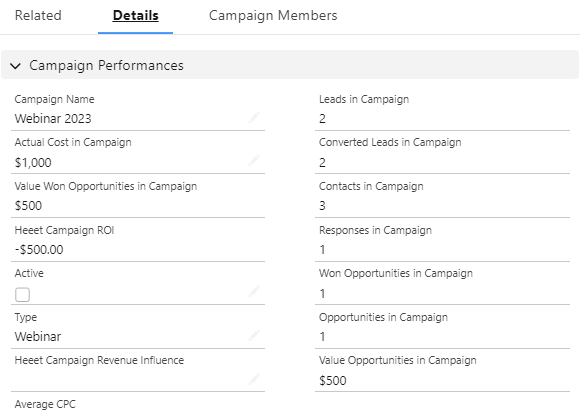
Engagement metrics (Campaign Member data)
These metrics come directly from Campaign Member records:
- Total Members: Number of Leads/Contacts added to the campaign
- Total Responses: Members who reached a "Responded" status
- Response Rate: Responses divided by total members
- Converted Leads: Members who converted from Lead to Contact/Opportunity
Pipeline metrics (Campaign Influence data)
These metrics require Campaign Influence to be enabled:
- Influenced Opportunities: Count of opportunities linked to the campaign
- Influenced Pipeline: Total value of open opportunities associated with the campaign
- Won Revenue: Closed-won opportunity value attributed to the campaign
- Win Rate: Won opportunities divided by total influenced opportunities
ROI calculation
Salesforce provides a built-in ROI formula on the Campaign object:
ROI = (Won Revenue - Actual Cost) / Actual Cost × 100
For this formula to work, you need to populate the "Actual Cost" field on each Campaign record and have Campaign Influence tracking revenue correctly.
Building useful Campaign reports
Start with these standard report types:
- Campaigns with Campaign Members: Shows engagement data per campaign
- Campaigns with Influenced Opportunities: Shows pipeline and revenue attribution
- Campaign ROI Analysis: Compares cost against revenue for each campaign
The reporting power of Salesforce Campaigns increases dramatically when you combine it with multi-touch attribution. Native reports show you what happened within Salesforce. Multi-touch attribution shows you the complete buyer journey, including touchpoints that native campaigns can't capture.
What are the limitations of native Salesforce Campaigns?
Native Salesforce Campaigns provide a solid foundation for campaign tracking, but they have significant gaps that prevent most B2B marketing teams from getting complete attribution visibility. The biggest limitation is that Salesforce Campaigns only track interactions you manually create or automate within the CRM. They miss the majority of the buyer journey.
Limitation 1: Manual campaign creation and member management
Every campaign must be created manually (or via automation you build yourself). Every member association requires explicit action. If your marketing automation doesn't sync properly, touchpoints get lost. For teams running dozens of campaigns per month across paid ads, organic content, events and email, this becomes a full-time job.
Limitation 2: Limited pre-conversion tracking
Salesforce Campaigns can only associate known Leads and Contacts. Anonymous website visitors, content consumers and ad viewers who haven't converted yet are invisible. You're missing the top of the funnel entirely.
Limitation 3: Incomplete multi-touch attribution
Even Customizable Campaign Influence only offers basic attribution models (first touch, last touch, even distribution). B2B buying journeys are complex. A prospect might interact with your brand 15+ times across six months before an opportunity is created. Native Campaign Influence doesn't support sophisticated models like W-shaped, time-decay or data-driven attribution.
Limitation 4: No cross-channel visibility
Salesforce Campaigns don't natively connect to your ad platforms (Google Ads, LinkedIn Ads, Meta). You can't see actual ad spend, click data or impression metrics alongside your CRM pipeline data without building custom integrations or using third-party tools.
Limitation 5: Cookie-dependent tracking gaps
Many marketing automation platforms that feed Salesforce Campaigns rely on third-party cookies for tracking. With browser privacy changes and cookie consent regulations, an increasing percentage of touchpoints go unrecorded. According to industry research, cookie-based tracking can miss 30-50% of web interactions depending on the audience.
How can you overcome Salesforce Campaign limitations?
Overcoming Salesforce Campaign limitations requires supplementing native CRM data with a CRM-native attribution solution that tracks every touchpoint across the full buyer journey within the system of record your org uses everyday. You need a tool that combines Salesforce's Campaign infrastructure with multi-touch attribution software that fills the visibility gaps.
Here's what a complete solution needs to cover:
Automated campaign creation and syncing
Instead of manually creating campaigns and adding members, use a tool that automatically creates Salesforce Campaign records when marketing activities occur. This includes paid ad clicks, organic content engagement, webinar attendance and event interactions. No manual work, no missed touchpoints.
Pre- and post-conversion tracking
Track the full buyer journey from first anonymous website visit through to closed-won revenue. This means connecting pre- and post-lead acquisition marketing activities in a single view, not just the moment someone fills out a form.
True multi-touch attribution models
Move beyond first-touch and last-touch to models that reflect how B2B buying decisions happen. Linear attribution distributes credit equally. W-shaped models weight key conversion points. Data-driven models use your actual data to assign credit algorithmically.
Cross-channel revenue visibility
Connect your ad platforms directly to Salesforce pipeline data. See exactly how much pipeline and revenue each Google Ads keyword, LinkedIn campaign or Meta ad set influenced. This is UTM tracking in Salesforce taken to its logical conclusion: every click tied to every dollar.
Cookieless tracking
Future-proof your attribution by using tracking methods that don't depend on third-party cookies. First-party data, server-side tracking and CRM-native solutions maintain visibility regardless of browser settings or privacy regulations.
Heeet was built specifically to solve these problems for B2B teams using Salesforce. As a native Salesforce attribution platform, it automatically creates and populates campaigns, tracks every touchpoint with cookieless technology and provides multi-touch attribution dashboards out of the box. You can even layer in self-reported attribution in Salesforce to capture qualitative data alongside your digital tracking. Implementation takes hours, not months.
Conclusion
Despite offering interesting data, standard Salesforce campaign has very important limitations.
- You are missing all the campaign influence that happened before the contact was created in Salesforce
- It is impossible to link an opportunity to multiple campaigns
- It requires a lot of manual CRM work
- It only supports the standard Opportunity amount to show the revenue from campaign. If you are using a custom field to measure opportunity revenue, then the standard campaign metrics wont show the total revenue.
The limitations above aren't bugs in Salesforce. They're the natural ceiling of native Campaign tracking, which is what Heeet was built to break through.
Heeet plugs straight into Salesforce or HubSpot, captures every pre-contact touchpoint with cookieless, GDPR-compliant tracking, automatically links opportunities to all the campaigns that influenced them, and updates Campaign Members so your reporting reflects the full buyer journey, not a sample of it.
No exports. No data leaving your CRM. No three-month implementation. Most teams go live in a few hours.
If you want pipeline reports that finally match reality, book a demo with Heeet and see what full multi-touch attribution looks like inside the CRM you already use.
Other articles
How To Connect Linkedin Ads with Salesforce
Heeet allows you to automatically sync all your Linkedin paid campaigns with Salesforce in order to measure the ROI of each $ spent on Linkedin.
TikTok integration with Salesforce campaigns
Sync TikTok Ads with Salesforce in 2 minutes using Heeet. Track costs, clicks, and revenue influence to measure your TikTok campaign ROI
Salesforce Campaign Influence: Pros, Cons & Limitations (2026)
Salesforce Campaign Influence connects campaigns to pipeline but it has real limits. See the pros, cons, attribution models, and how to fill the gaps.
.svg)
Ready to track prospects from lead to close with Heeet?
Heeet gives marketers and sales professionals at IT & Security firms turn geuss work intro informed decisions that drive revenue while meeting the same secruity technical standards you provide your clients.