How to connect Linkedin Ads with Salesforce


Setup

In Salesforce, click on the app launcher and search for Heeet.The Heeet settings page will open in a new window.For each integration you want to activate, click on the"Sign Up" / "Connect" button.Select a start date from which you'd like to startgetting your campaigns data in Salesforce.


Select Start Date

Set a start date (we recommend to use today date to avoid syncing historical data and startcollecting campaign costs, impressions and clicks from today) + click on Save


Connect your account

Click on Ad Accounts and Sign in with Linkedin and connect your account (check all the permissions).

  1. You should see a confirmation message
image info
  1. Select customer accounts you want to sync and click on Save
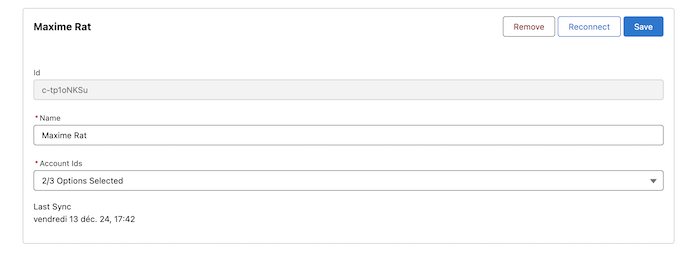
image info
  1. It is done with Linkedin Ads. The sync will occur every hour.


Setup Conversion triggers

  • Go to Heeet Settings > Integrations > Linkedin Ads (A)
  • Click on Conversion Triggers (B) and on New (C)
  • Give a name to your conversion trigger (ex: closed won opportunity)
  • Select the connected Linkedin Ads account, customer ID and existing Linkedin Ads conversion (D)
  • Select the triggering Salesforce object (E)
  • Add a condition and fill in the value which should trigger the event. (F) Please note that you have to paste the API name of the field value. Exemple: You want to send an event to Linkedin Ads when a lead is converted. Then you will have to select the API name of the Lead « Status » field
  • Select what amount field should be sent as conversion value (G)
  • Finally, select what Gclid field (unique advertising ID associated to a user) should be used. (H)
  • You can select either Heeet First Click Google Gclid or Heeet Last Click Google Gclid.

Tip: if you want to use first click Gclid if last click Gclid is missingor last click Gclid is first click Gclid is missing, ask a SalesforceAdmin to build a Formula Field in Salesforce (« GCLID ») takingone or the other value.

image info


Setup Interaction Detector

Click on Social Accounts and Sign in with Linkedin and connect your account (check all the permissions).

  1. You should see a confirmation message
image info
  1. Select companies you want to track and click on Save
image info
  1. If a Lead or Contact with the same FirstName and LastName is detected in your Salesforce, Heeet will create a new Digital Influence with type Like or Comment


LinkedIn Ads Features

With LinkedIn Ads integration, you can:

  • Track B2B campaign performance and lead generation
  • Monitor cost per lead (CPL) and conversion rates
  • Analyze professional audience demographics
  • Sync conversion events back to LinkedIn for optimization
  • Track social interactions and engagement
  • Create custom audiences based on company size, industry, and job titles
End Google Tag Manager (noscript)