
How to Track Calendly Submissions
This guide will show you how to track Calendly bookings using Heeet by capturing lead information after a booking and sending it to your CRM.
Overview
To track Calendly bookings with Heeet, you will:
- Create a redirect confirmation page that Calendly sends users to after booking, passing all relevant parameters in the URL.
- Add a hidden form and Heeet Javascript to this confirmation page, extracting lead information from the URL and populating the form.
- Send the form data to your CRM using a webhook or integration.
Step 1: Set Up a Redirect Confirmation Page in Calendly
- In your Calendly event settings, go to Scheduling > Confirmation Page.
- Set your redirection URL and check Pass event details to your redirected page..
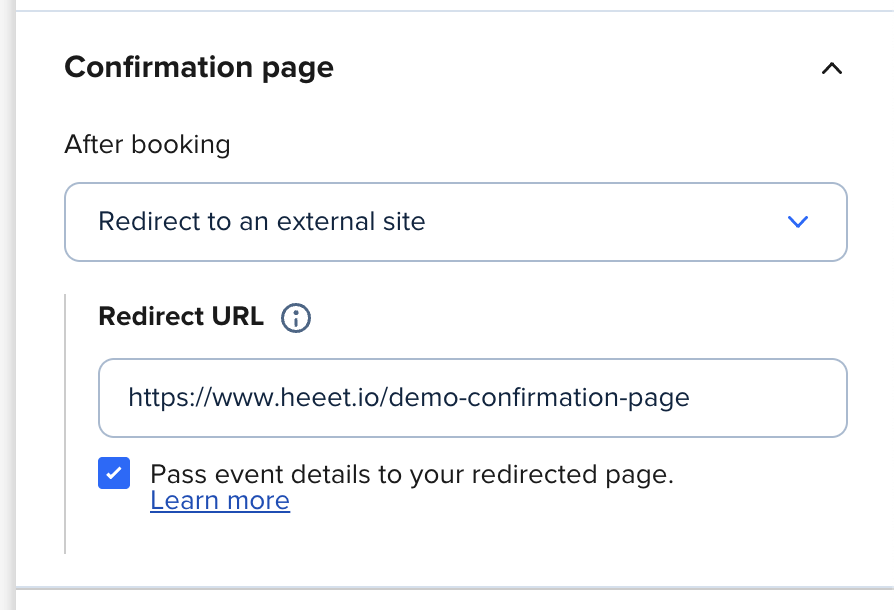
Refer to Calendly documentation for available variables.
Step 2: Add a Hidden Form and Heeet Script to Your Confirmation Page
On your confirmation page, add a hidden form that will capture the lead information from the URL and send it to your CRM. Use the Heeet Javascript SDK to track the visit and form submission.And add the end, submit your form in the background
Example HTML:
<form action="https://webto.salesforce.com/servlet/servlet.WebToLead?encoding=UTF-8" method="POST" id="formHeeet" name="formHeeet" style="display:none;">
<input name="oid" type="hidden" value="xxxxx">
<input name="retURL" type="hidden" value="">
<input id="company" maxlength="40" name="company" id="company" type="text">
<input id="last_name" maxlength="80" name="last_name" type="text">
<input id="email" maxlength="80" name="email" type="text">
<input id="Demo_Date__c" maxlength="80" name="xxx" type="text">
<input id="Heeet__Data__c" name="Heeet__Data__c" type="text">
</form>

<script>

const url = new URL(window.location.href).searchParams;

const company = url.get('answer_1');
const name = url.get('invitee_first_name') + ' ' + url.get('invitee_last_name');
const email = url.get('invitee_email');
const eventDate = url.get('event_start_time');
const action = url.get('action');

console.log(company, name, email, eventDate, action);

const compField = document.querySelector('input[id="company"]')
compField.setAttribute("value", company);

const nameField = document.querySelector('input[id="last_name"]')
nameField.setAttribute("value", name);

const emailField = document.querySelector('input[id="email"]')
emailField.setAttribute("value", email);

const date = new Date(eventDate)
const formattedDate = date.toLocaleDateString('fr-FR', {});
const formattedTime = date.toLocaleTimeString('fr-FR', {}).substr(0, 5);

const demoDate = document.querySelector('input[id="Demo_Date__c"]')
demoDate.setAttribute("value", `${formattedDate} ${formattedTime}`);

$('#formHeeet').on('submit', function(e) {
    e.preventDefault();
    $.ajax({
        url : $(this).attr('action'),
        type: "POST",
        data: $(this).serialize(),
        success: function (data) {
            console.log('w2l Sent');
        },
        error: function (jXHR, textStatus, errorThrown) {
            console.log(errorThrown);
        }
    });
});

if(eventDate) {
    setTimeout(() => {
     $('#formHeeet').submit();
    }, "2000")
}

</script>




