Send Offline Conversions to Google Ads
Prerequisites
Before starting, make sure that:
- Heeet is installed and configured in your Salesforce org
- The Google Ads integration is connected in Heeet
- Google click IDs (GCLID) are captured and stored in Salesforce
- The Google Ads conversion action already exists
- You have access to Salesforce objects used for conversion tracking (Lead, Contact, or Opportunity)
Step 1: Create a Conversion Trigger
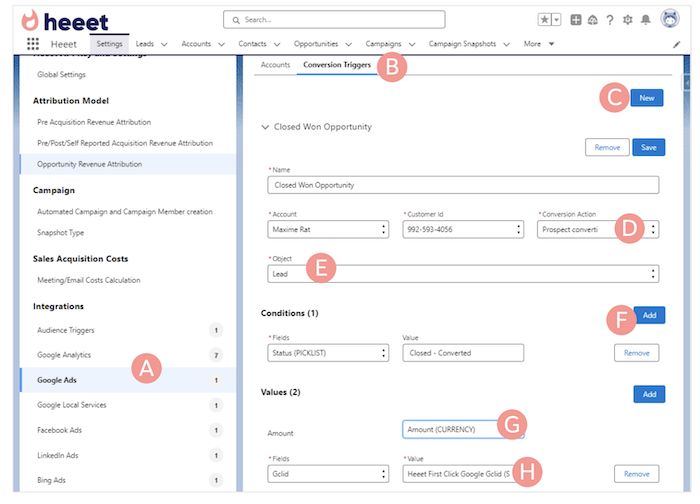
- Open Conversion Triggers (B)
- Click New (C)
- Select the connected Google Ads account, customer ID and existing Google Ads conversion (D)
- Select the Salesforce object that will trigger the conversion (Lead, Contact, or Opportunity) (E)
Step 2: Define the Triggering Condition
- Add a condition that defines when the conversion should fire (F)
- Example: Lead status = Qualified
- Example: Opportunity stage = Closed Won
- Use the API name of the Salesforce field and value
Step 3: Map Conversion Value and Identifier
- Select the Salesforce amount field to send as the conversion value (G)
- Choose the GCLID field to associate the conversion with the original click (H)
Tip: if you want to use first click Gclid if last click Gclid is missingor last click Gclid is first click Gclid is missing, ask a SalesforceAdmin to build a Formula Field in Salesforce (« GCLID ») takingone or the other value.
Step 4: Save and Activate
- Click Save
Once saved, offline conversions are sent automatically to Google Ads when conditions are met.
What Happens After Setup
- Conversions are sent automatically from Salesforce to Google Ads
- Google Ads attributes conversions to campaigns, ad groups, and keywords
- No manual CSV uploads are required
- Data stays aligned with real CRM outcomes
Platform
Resources
Company
Compare
Free Tools
Features
Industries