

Connect LinkedIn Ads to Salesforce
Prerequisites
Before starting, make sure you have:
- Admin access to Salesforce
- Access to the LinkedIn Ads account (Campaign Manager)
- Heeet installed and enabled in your Salesforce org
Step 1: Choose the Data Start Date
Set a start date (we recommend to use today date to avoid syncing historical data and startcollecting campaign costs, impressions and clicks from today) + click on Save

Step 2: Connect to LinkedIn Ads
Click on Ad Accounts and Sign in with Linkedin and connect your account (check all the permissions).
- You should see a confirmation message

- Select customer accounts you want to sync and click on Save
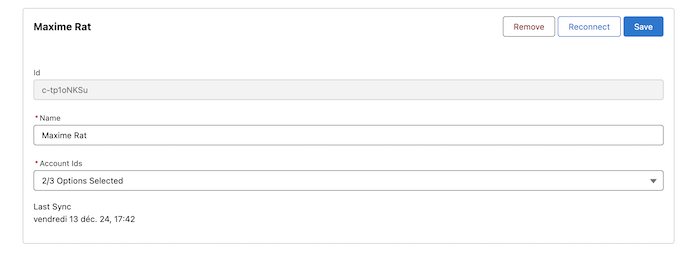
- It is done with Linkedin Ads. The sync will occur every hour.
Step 3: Automatic Campaign Sync
Once authentication is complete, the connection is active.
From this point:
- All active LinkedIn Ads campaigns are automatically detected
- Metrics such as impressions, clicks, CPC, and spend are synced
- Data is refreshed every hour
All data is available directly inside Salesforce via Heeet
No manual sync or maintenance is required.
Platform
Resources
Company
Compare
Free Tools
Features
Industries



